On April 7, 2026, Google Workspace rolled out an open beta for a new feature allowing users to book Google Workspace resources (such as meeting rooms, projectors, and company vehicles) directly from external calendar systems like Microsoft Outlook. For hybrid organizations operating both Microsoft 365 and Google Workspace, this officially eliminates a long-standing operational pain point in meeting coordination.
This article provides IT administrators and IT teams with a clear breakdown of how the feature works, eligible subscription tiers, Admin Console configuration steps, interactions with Calendar Interop, and how SMBs can best capitalize on it.
What is changing: The end of the barrier preventing external users from booking GWS meeting rooms
Previously, booking Google Workspace resources like meeting rooms and shared equipment was restricted almost exclusively to users within the same Workspace domain. When working with clients on Microsoft 365 or managing mixed environments with Outlook users, organizations faced frustrating friction:
- When external partners needed a room, an internal contact had to proxy the booking via Google Calendar
- Departments merged through reorganizations or M&A that retained Microsoft 365 ended up managing duplicated booking workflows
- Hybrid setups frequently required asking "Is the room free?" over Slack or phone calls
With this new feature, external users (or entire external domains) authorized via the Admin Console can book rooms simply by adding the resource's email address to their Outlook meeting invite. If auto-reply is enabled on the resource, it automatically accepts or declines based on real-time availability and notifies the organizer via email.
There is no longer any need to "issue Google accounts solely for room scheduling"; external guests can seamlessly complete bookings directly from their calendar.
Supported plans and prerequisites
| Plan tier | Status |
|---|---|
| Google Workspace Business(Starter / Standard / Plus) | ✅ Supported |
| Google Workspace Enterprise(Starter / Standard / Plus) | ✅ Supported |
| Google Workspace Education(Fundamentals / Standard / Plus) | ✅ Supported |
| Frontline / Nonprofits | ✅ Supported |
| Personal accounts / Free Gmail | ❌ Not supported |
A major advantage is that all tiers from Business Starter to Enterprise Plus are supported. Small businesses and enterprise deployments alike can leverage it without distinction.
The rollout follows a gradual release schedule beginning April 7, 2026, and may take 15 days or longer to appear in certain tenant consoles. Rapid Release domains receive it first, followed shortly by Scheduled Release domains.
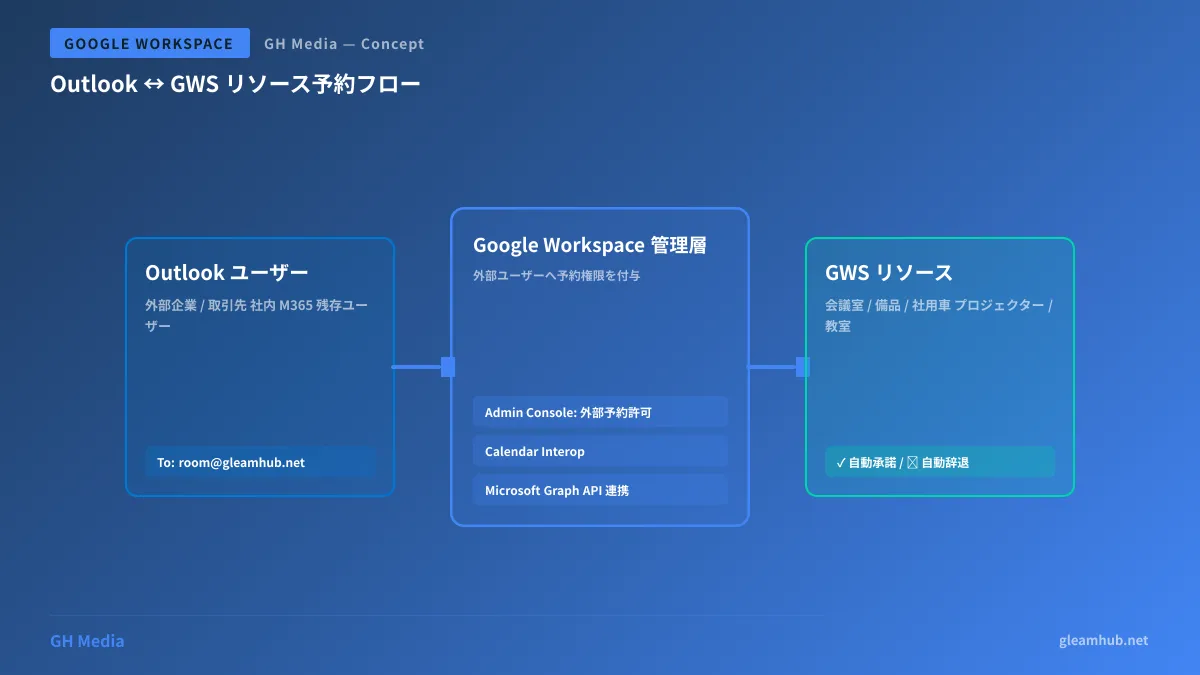
High-level workflow architecture
The booking workflow using the new capability is illustrated below. Users on the Outlook side simply create calendar invites as usual, while Calendar Interop and Admin Console permissions seamlessly interact behind the scenes.
Setup procedure (for administrators)
Step 1: Enable external user bookings in the Admin Console
Sign in to the Google Workspace Admin Console and select the target resource (e.g., "Tokyo HQ Meeting Room A") under the Buildings and resources menu.
Under the "Booking permissions" settings, configure one of the following:
- Specific external users: Specify individual email addresses (e.g.,
taro@partner-company.com) - Entire specific domains: Grant access to an entire partner domain (e.g.,
@partner-company.com)
Step 2: Configure Calendar Interop (when coexisting with Microsoft Outlook)
To allow Outlook users to look up availability and search resources by name, enable Calendar Interop. In the Admin Console, navigate to Apps → Google Workspace → Calendar → Calendar Interop:
- Configure the connection with Microsoft Exchange or Microsoft Graph API
- Select the scope of published availability (individual schedules / resources only / full availability, etc.)
- Send a test request to confirm that bidirectional free/busy lookups are working properly
In Microsoft 365 environments, we recommend using the Microsoft Graph API integration introduced in May 2025. It is significantly more stable than legacy EWS integrations and uses OAuth 2.0 authentication.
Step 3: Establish clear resource naming conventions
Adopting clear naming conventions, such as adding a prefix to room names, makes it much easier for Outlook users to search for resources. For example:
[GWS] 東京本社_会議室A_8名
[GWS] 大阪支社_応接室_4名
Adding a "[GWS]" prefix allows users to immediately recognize Google Workspace-managed resources within Outlook's scheduling interface.
Step 4: Share user guidance with external partners
Sharing a concise guide like the following with external users ensures a smooth transition:
When booking via Outlook: Create a meeting invite and add the resource email address (e.g.,
tokyo-meeting-a@gleamhub.net) to the attendee list. If available, the resource will automatically accept; otherwise, it will decline the invitation.
Use cases: Which organizations benefit most?
1. Organizations with remaining Microsoft 365 users post-M&A or departmental mergers
As highlighted in our comparison of Google Workspace and Microsoft 365, organizational integrations often involve a cohabitation period spanning months or years before full consolidation. Sharing meeting spaces during this interim period has traditionally caused major friction, which this feature directly resolves.
2. Recurring meetings with external partners and clients
When recurring meetings are organized from a partner's Outlook calendar, they can now reserve your internal (GWS) meeting rooms directly, eliminating the need to have an assistant book rooms on their behalf.
3. Hosting guest lecturers at educational institutions
Because Education plans are also supported, visiting instructors using Microsoft 365 can directly reserve on-campus lecture halls and AV equipment, cutting administrative overhead for academic coordinators.
4. Shared office spaces and coworking facilities
In multi-tenant office facilities where building management runs Google Workspace while tenants use Outlook, shared amenities (meeting rooms, printer reservations, etc.) can be managed centrally.
Relationship with Calendar Interop
While the new feature works independently, pairing it with Calendar Interop unlocks its full potential. The division of responsibilities is as follows:
| Features | Standalone benefit | Combined with Calendar Interop |
|---|---|---|
| New feature (external user booking permissions) | Direct booking via resource email address | + Search by resource name and check real-time availability |
| Calendar Interop | Mutual free/busy lookups between personal calendars | + Integrated resource scheduling management |
Calendar Interop handles "mutual free/busy availability lookups," while the new feature handles "granting resource booking privileges." Enabling both gives Outlook users an experience on par with native Google Calendar users.
Operational security considerations
Granting resource booking permissions to external parties inherently reveals room availability schedules externally. Depending on your security policies, this may raise concerns such as:
- Resource usage patterns themselves being sensitive (e.g., frequency of executive boardroom meetings)
- Meeting organizer names revealing organizational structures
As outlined in our Google Workspace Security Checklist, it is safest to classify resources into "publicly shareable" and "internal-only" categories before expanding external booking privileges.
Conclusion: Practical impact on hybrid organizations
Google Workspace began seriously addressing "coexistence with Microsoft 365 users" in 2025, and this feature represents a major milestone. From an SMB operations standpoint:
- Eliminates proxy bookings: Removes the administrative overhead of booking rooms on behalf of others
- Speeds up external meeting scheduling: Ends back-and-forth messages like "I'll reserve the room later"
- Simplifies M&A integration periods: Removes pressure to rush full platform migrations
Although currently in open beta, support starting from Business Starter means you can try it immediately. A smart first step is enabling external bookings on a single test room in the Admin Console to evaluate operational fit.