"Since last month, our inquiry form notifications don't seem to be arriving. Clients tell us they sent an email, but it's not in our inbox." This consultation came from someone handling both general affairs and accounting at a company of about a dozen people.
Upon investigation, the cause was neither spam filters nor DNS issues. The company was keeping custom domain emails starting with info@ on their rented hosting server's mailbox, while pulling and reading them using free Gmail's "Check mail from other accounts" feature. Google has been gradually phasing out this fetching feature, and the effects were beginning to surface.
This practice is remarkably common among small and medium-sized businesses. Acquiring a domain, renting a server, utilizing the included mail hosting, and reading messages in the familiar Gmail interface—this progression is entirely natural. That is precisely why companies are caught off guard and disrupted without realizing the deadline was approaching.
What Is Ending Is the Feature That "Pulls External Email into Gmail"
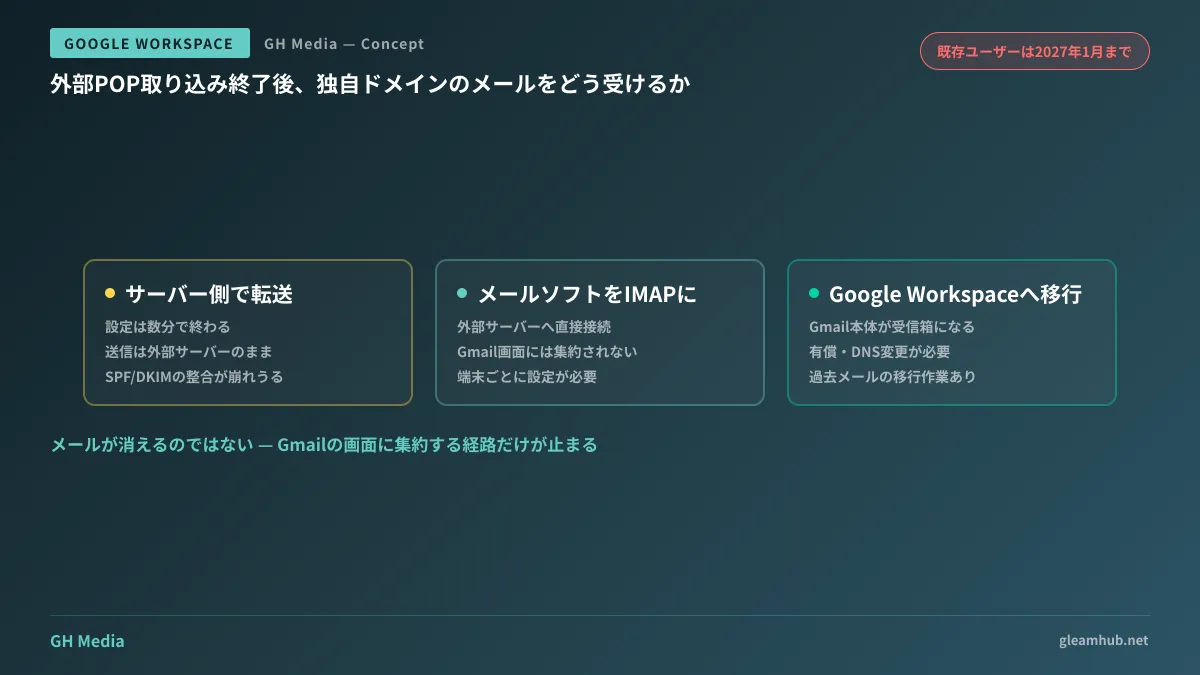
Let us clarify exactly what is stopping. The targets are "Check mail from other accounts" (external email retrieval via POP3) and Gmailify in Gmail settings. According to Google Help, availability for new users ends starting in Q1 2026, while existing users can continue using it until January 2027 (Upcoming changes to Gmailify and POP in Gmail — Gmail Help).
Let us also clarify what is not stopping. Emails themselves will not stop arriving. Delivery to external mail servers remains completely unaffected, and messages will continue to reside there as before when viewed via that server's webmail or an email client. The only part being disabled is the pathway aggregating messages into the Gmail UI. Conversely, in setups relying solely on the Gmail interface, emails will pile up on the server without anyone noticing.
This distinction is vital. In the company mentioned at the outset, the emails presumed lost were actually sitting in the rental server's mailbox all along. Nothing was lost; they had simply been accumulating unnoticed for three weeks in a place nobody was looking.
Confirm Whether Your Company Is Affected in Five Minutes
Determining whether you are affected is straightforward. Open Gmail, navigate from Settings (the gear icon) to "See all settings," and select the "Accounts and Import" tab. If any address other than @gmail.com is listed under "Check mail from other accounts," your company is affected. If nothing is registered there, this issue does not concern you.
An easily overlooked scenario is when company email is fetched into personal Gmail accounts. Even if the company subscribes to Google Workspace, specific staff members might concurrently fetch info@ into their personal Gmail to read it. Not only does this face disruption from the deprecation, but it also carries the risk of company emails remaining in personal accounts upon an employee's departure. It is safer to assume your audit scope must extend beyond accounts directly managed by the company.
Subscribing to Google Workspace is no guarantee of safety either. The Workspace version of Gmail contains the exact same "Check mail from other accounts" setting, and some companies have left their migration half-finished by fetching email from their old server. While assuming they have transitioned to Workspace, in reality, they remain reliant on POP fetching.
Three Alternative Paths and the Problems Each Leaves Behind
There are broadly three countermeasures. None is a perfect silver bullet; they merely leave behind different problems.
| Measure | Scope | Remaining Problems |
|---|---|---|
| Server-side forwarding | Configure the external mail server to forward automatically to Gmail | Outbound sending remains on external servers. SPF/DKIM alignment breaks, occasionally causing messages to be rejected at the forwarding destination |
| Using email clients with IMAP | Connect to external servers via IMAP rather than POP using Outlook, Thunderbird, etc. | Emails are not consolidated in the Gmail interface. Configuration required on every device |
| Migrating to Google Workspace | Operate the custom domain on Google Workspace and make native Gmail the inbox | Paid service. Involves DNS changes and historical email migration |
Forwarding is the easiest option; setup takes only a few minutes. However, forwarding tends to degrade email deliverability, so it is not a direct drop-in replacement. Because Sender Policy Framework (SPF) declares that "emails from this domain originate from this server," introducing forwarding in the middle destabilizes the receiving server's evaluation. The nuances of domain authentication are detailed in Protecting Deliverability with Email Authentication and DMARC, which you should review before opting for forwarding as a stopgap.
Switching to IMAP means abandoning the Gmail interface altogether, running directly counter to the initial desire to keep familiar workflows intact.
If Choosing Migration, Do Not Get the Order Wrong
If you decide to consolidate onto Google Workspace, the work itself is not difficult. What causes incidents is getting the sequence wrong.
First, create the accounts, set up users, finish migrating historical emails, and only then switch the MX records as the final step. If this order is inverted, new emails will start arriving at Google the moment the records are switched, creating an outage gap where destination mailboxes and historical data are not yet ready. Even a gap of several hours can be painful for customer inquiry addresses.
For small volumes, historical email migration can be performed manually via email clients, but when dealing with multiple users and years of history, using data migration services is far more reliable. A key decision criterion here is determining which addresses truly need to be retained. Transferring unused shared addresses makes migration unnecessarily cumbersome. Taking advantage of the inventory process to declutter will ease future management.
Keep the old server's mailboxes active for a while after switching MX records, as some emails will still be delivered to the old server during DNS propagation. Operating with temporary forwarding from the old server and monitoring both environments for one to two weeks is the safe approach.
Articles addressing similar migrations from different starting points include Migrating from Microsoft 365 to Google Workspace and Migrating from Domestic Japanese Groupware. Regardless of the source environment, keeping the MX record switch as the final step remains a universal rule.
The Value of Taking Action While the Deadline Is in Sight
The January 2027 deadline may seem like plenty of time. However, this type of deadline carries the highest cost when you only "notice after it stops working." The company mentioned earlier failed to notice three weeks of inquiry emails, and it remains unknown how many business opportunities were lost during that time.
There is one thing you can do today: open "Accounts and Import" in Gmail and check whether external addresses are registered. If any are present, your organization is affected. From there, you can weigh whether to rely on forwarding as a temporary measure or migrate to Google Workspace, comparing sending reliability against operational overhead.
Whether you want to audit your company's inbound email pathways or map out the migration schedule and cutover timing together, GleamHub is here to assist through our free IT and Google Workspace consultations. Catering to setups without dedicated IT staff, we propose solutions starting with seamless cutover sequences that avoid downtime. Because optimal configurations vary depending on requirements, we provide customized estimates. Please reach out via Contact Us.
Sources
- Upcoming changes to Gmailify and POP in Gmail — Gmail Help
- Check emails from other accounts — Gmail Help
- Gmail POP mail retrieval support is ending: explaining three workarounds and which is best — MuuMuu Domain Media
- Will external email stop arriving in Gmail? The January 2026 specification changes and immediate actions to take — @IT
- Change Gmail settings (Google Workspace Admin Help)