
You want external materials and drafts for your recruiting page to be readable with screen readers. But you do not have time to check heading structure and image alt text one by one. In situations like this, an add-on that points out problems inside Google Docs or Slides and fixes them on the spot would be handy.
An add-on for exactly that, "Accessibility Checker" (repository name ws-a11y-checker), has been published in the googleworkspace organization on GitHub. It runs on Apps Script, and there are also steps for deploying it from the Google Workspace Admin console to everyone in your organization or to specific organizational units.
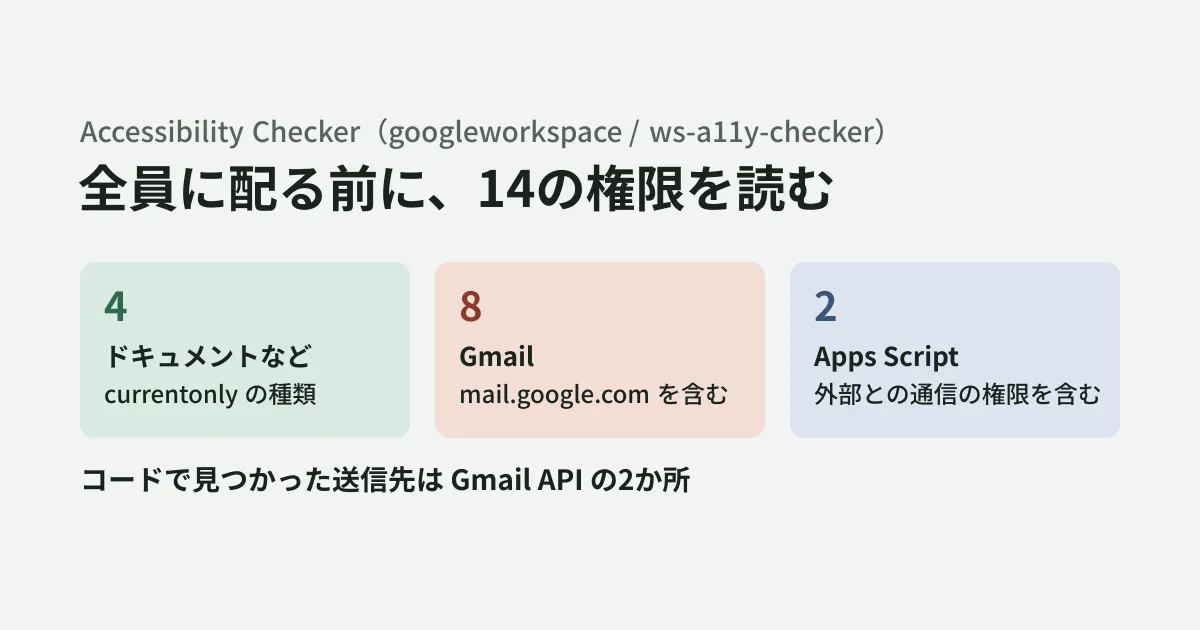
However, it is administrators who deploy it. If you deploy this add-on internally, it reaches everyone requesting 14 permissions, including access to users' Gmail. In this article, based on what we read after fetching the repository (commit d11c325 from August 27, 2026) on October 29, 2026, we lay out the points to check before deploying.
What the add-on can do
According to the README, it covers Google Docs, Slides, Sheets, Forms, and Gmail (drafts being composed and opened messages). With the aim of meeting WCAG 2.1 Level AA, it checks items such as the following.
- Contrast between text and background (at least 4.5:1 for normal text, and at least 3:1 for large text of 18pt or more)
- Skipped heading levels, and paragraphs styled only to look like headings
- Spacing made by stacking empty paragraphs, and tables whose header rows are not marked
- Link text that does not say where it goes, such as "click here" or "learn more" (examples from the README; raw pasted URLs are also flagged)
- Missing image alt text
- Justified text, line spacing below 1.15, and uninformative headings such as "Section" or "Details"
- Reading order on slides (there is a screen for reordering)
Contrast, headings, tables, justification, line spacing, and similar items can be fixed with a single button. Link text, alt text, and uninformative headings are left for users to fix. For display languages, the README lists English, Spanish, French, German, and Japanese.
The license is Apache 2.0. We found no statement in the README or the deployment guide (DEPLOYMENT.md) promising that it is offered or maintained as a Google product. As of October 29, 2026, there is no announcement of this add-on on the Google Workspace Updates blog, and it has no public listing on Google Workspace Marketplace. Searching Marketplace for "Accessibility Checker" turns up items such as "Accessibility Checker for Docs," but these are from other companies such as Lovely API and are separate from the add-on in this repository. What you deploy internally is an add-on built into your own Google Cloud project and Apps Script project, and managed by your company.
The deployment flow, and what administrators own
The deployment flow described in the guide is as follows.
- Fetch the repository, build it, and push it to your own Apps Script project
- Create your own Google Cloud project and link it to the Apps Script project
- Create the OAuth consent screen as "Internal" (users in your own domain only) and register the 14 scopes
- Publish it with the Google Workspace Marketplace SDK, with visibility set to "Private" (limited to your own domain)
- Install it from the Admin console for everyone or for specific organizational units or groups
The guide explains that to update it, you bump the version of the same Apps Script deployment, and the Marketplace listing is updated without reinstalling it in the Admin console. In other words, anyone who can write to the Apps Script project can change the contents of the add-on deployed to everyone. You need to decide who the project's editors will be before deploying.
Reading the 14 scopes
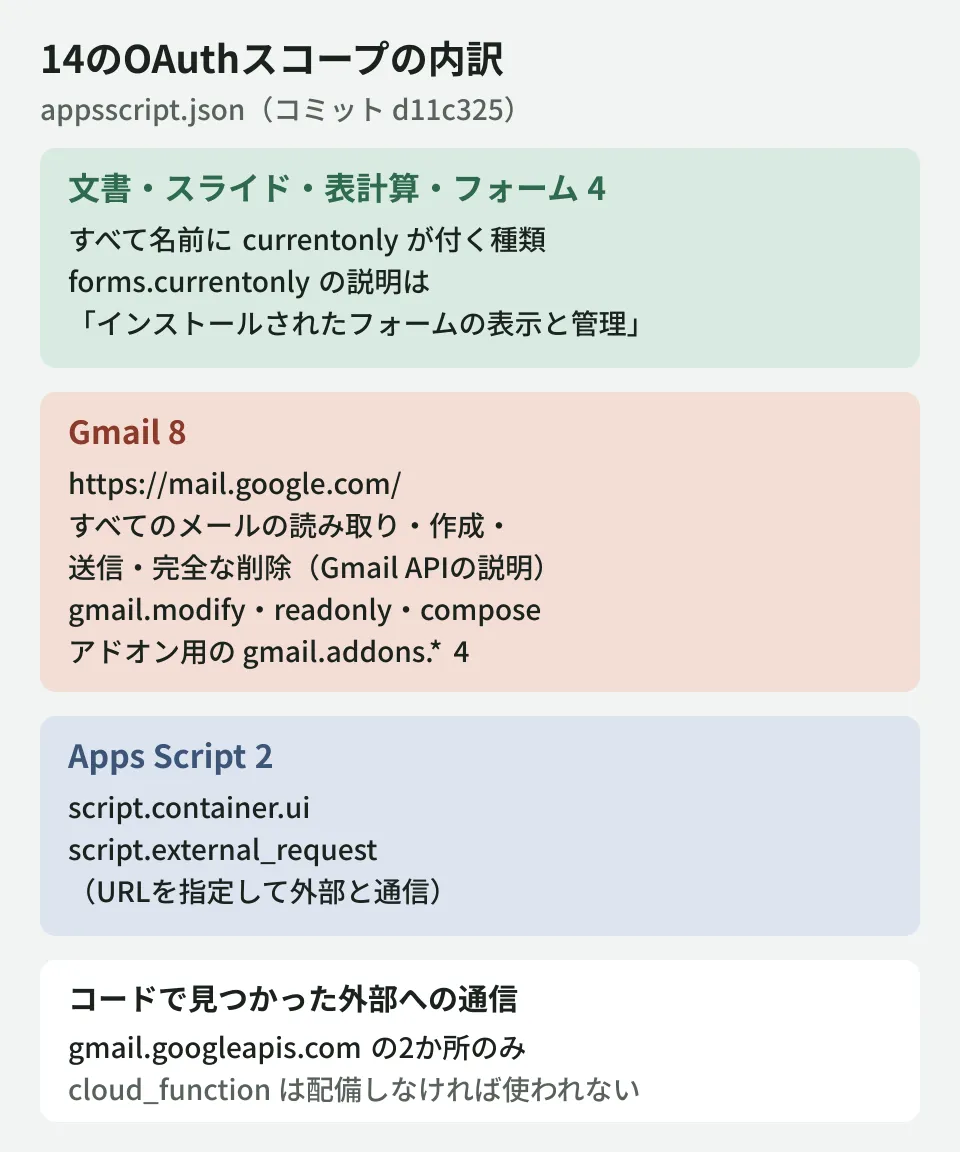
There are 14 scopes listed in appsscript.json. Dividing them into three groups as in the diagram shows how they differ in nature.
Docs, Slides, Sheets, and Forms (4) are all the kind with currentonly in their names. In the Apps Script API documentation, forms.currentonly is described as "View and manage forms that this application has been installed in." The three for Docs, Slides, and Sheets also share the same currentonly naming, and they are different scopes from documents and drive, which cover all of a user's files (described in the same documentation as "See, edit, create, and delete all your Google Docs documents" and "See, edit, create, and delete all of your Google Drive files").
Gmail (8) includes, in addition to the kind limited to while the add-on is running or being used (gmail.addons.current.*), broader ones. The descriptions in the Gmail API documentation (discovery document) are as follows.
https://mail.google.com/: Read, compose, send, and permanently delete all your email from Gmailgmail.modify: Read, compose, and send emails from your Gmail accountgmail.readonly: View your email messages and settingsgmail.compose: Manage drafts and send emails
The README describes the manifest as a "least privilege" configuration. That holds for the Docs side, but for Gmail, the configuration requests permissions that extend to the entire mailbox, not just when the add-on is opened. Reading the code, it lists drafts, rewrites drafts, and retrieves message bodies and attached images via the Gmail API, and these permissions appear to be used for that. However, the editorial team has not tested which scopes can be removed before it stops working.
Apps Script (2) are script.container.ui and script.external_request. The latter is the scope required to use the service that communicates with other hosts on the internet (URL Fetch, UrlFetchApp) (according to the UrlFetchApp page in the Apps Script reference).
How external communication is handled in the code
The README and the guide state that it "runs within the institution's Apps Script and Google Cloud projects, with no external third-party data processing." Searching the backend code at commit d11c325 for external communication (UrlFetchApp.fetch), we found 2 places, both requests to gmail.googleapis.com (the Gmail API). They are for extracting images embedded in emails.
On the other hand, the repository has a folder called cloud_function containing Cloud Functions code that sends images to Gemini on Vertex AI (gemini-1.5-flash-002, us-central1) to generate alt text, along with a script to deploy it. This script deploys it with --allow-unauthenticated (callable without authentication) and is set to add Access-Control-Allow-Origin: * to responses. We found no place in the backend or UI code at the same commit that calls this function. Alt text suggestions are generated by rules in the code (removing set prefixes and building names from URLs).
Two things can be said from this.
- If you deploy only the add-on as the guide describes, the only destination we could confirm in the code was the Gmail API
- Deploying
cloud_functionadds a path that sends images from emails and documents to Vertex AI. With the deployment script as is, anyone who knows the URL can call it
As long as script.external_request is present, future updates could add more destinations. You can pin the destinations with urlFetchWhitelist in the manifest (an allowlist of URLs declared by the script's author). The Apps Script documentation says this field is "optional for test deployments but required for versioned deployments," but it is not present in appsscript.json at commit d11c325. We have not checked how this is handled when deploying as the guide describes, so the reliable approach is to add the Gmail API URLs the code calls and test before deploying.
Note that the allowlist administrators enforce across the whole organization ("Import and fetch from URLs" in the Admin console) is a separate setting. We covered it in Where is GAS communicating outside your organization?.
What to watch out for with Gmail auto-fix
Gmail's "fix all" process overwrites the draft with the corrected body. In the code, if the target draft's ID cannot be obtained, it is implemented to target the first draft in GmailApp.getDrafts() (resolveDraftContent and rpcApplyAllGmailFixes). Whether an unintended draft could be overwritten for users with many drafts is something you should check with a test account before deploying. The editorial team has not checked its behavior in a Workspace environment.
Also, the feature that creates test documents appends test content to the end of the open document, and in Gmail it creates a draft with the subject "Accessibility Audit Demo Draft (WCAG Test Suite)." To be safe, include a note in your user guidance not to try it on production documents.
Check how logs are handled as well. The manifest is set to send exception logs to Cloud Logging (exceptionLogging: STACKDRIVER), and the code still contains many debug logs that output email IDs and image information. Who can view the logs is determined by permissions on the Google Cloud project.
What to decide before deploying
Based on the above, the editorial team proposes the following order.
- Narrow the deployment scope: Start with the organizational units or groups of departments that send materials outside the company, not everyone. The guide also shows how to specify organizational units or groups
- Decide whether you need the Gmail features: If documents alone are enough, one option is to build your own version with the Gmail scopes and the manifest's
gmailsetting removed. Verify the behavior with them removed yourself - Pin the destinations: Add
urlFetchWhitelistto the manifest, and do not deploycloud_functionif you will not use it. If you will use it, deploy it with authentication - Assign responsibility for updates: Decide who the Apps Script project's editors are and who reviews changes when pulling them in from the upstream repository
- Test with a test account: Check Gmail auto-fix with multiple drafts present, and confirm that one-click fixes do not change the content of documents
Reviewing your inventory of add-ons and integrated apps together with the items in the Google Workspace security settings checklist makes it easier to keep your approval criteria consistent.
Scope of verification
On October 29, 2026, we fetched
googleworkspace/ws-a11y-checkeron GitHub (commitd11c325, August 27, 2026) and read the README, DEPLOYMENT.md,appsscript.json, and the backend and Cloud Functions code (desk research). We confirmed the scope descriptions against the discovery documents for the Gmail API and the Apps Script API and Google's list of OAuth scopes. On the same day, we also reviewed the Apps Script documentation (UrlFetchApp, the manifest, and the URL allowlist), the Admin Help steps for installing Marketplace apps, the Google Workspace Updates blog, and Marketplace search results. We did not run the repository's tests or build, and did not verify installation or behavior in a Google Workspace environment.
For a review of the permissions of add-ons deployed internally or the design of your Google Workspace administration, please contact us through our free IT and Google Workspace consultation.





