A frontline receptionist handles primary responses to inquiries sent to a company's main address. While a common workflow, does it sound familiar that replies stop for half a day only when that person visits client sites? The assignee is working diligently. They check their own inbox on their smartphone and keep notifications on.
Even so, replies stalled because delegated accounts did not appear in the mobile Gmail app. Gmail delegated access was long a desktop browser exclusive, leaving no way to open the delegated inbox from mobile apps. When assignees said "I will check it after returning to the office," they were simply adhering to specifications, not slacking off.
This gap was bridged in the summer of 2026. Google enabled delegated Gmail accounts to be managed from the Gmail app on Android and iOS, completing rollouts for Android in early July and iOS in late July.
More was added than just reading
When hearing about mobile support, one might assume view-only access, but what was introduced goes beyond that. Delegates can read, organize, and send emails in the name of the delegated account directly within the app.
In terms of operation, you simply tap the profile icon in the top right of the Gmail app and select the delegated account from the account list. You can switch between your own inbox and the delegated account, and unread counts for the delegated inbox can also be checked from the account menu.
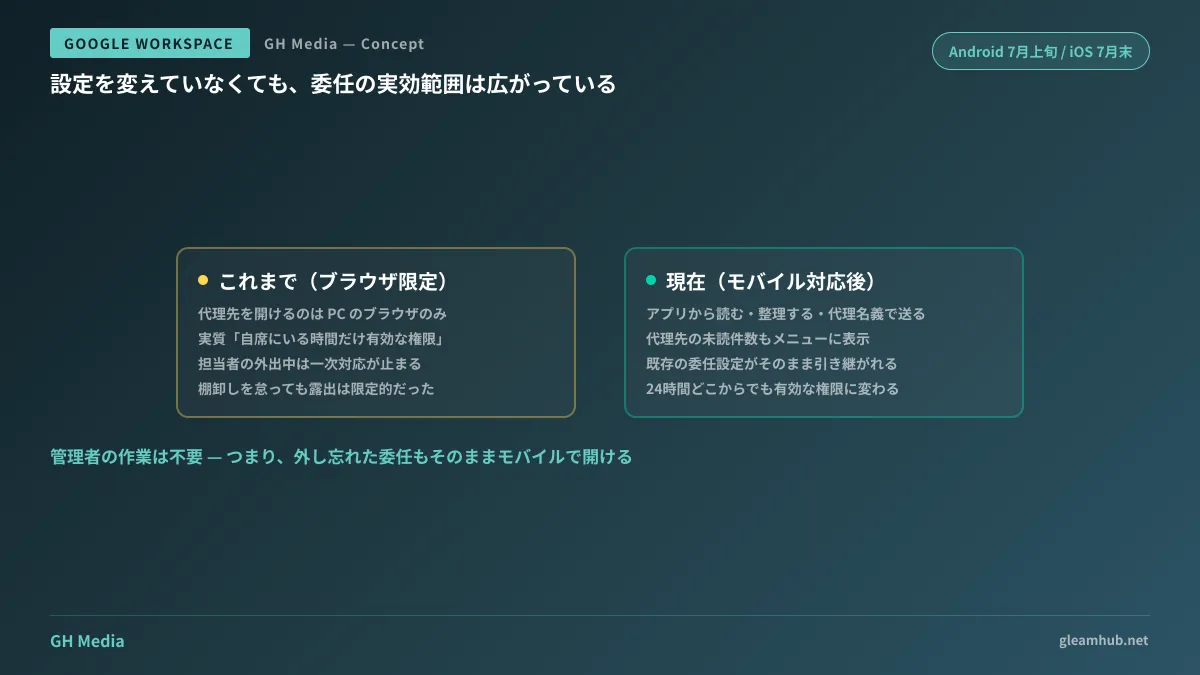
No administrator action is required. Existing delegation settings carry over automatically, and granting or revoking delegations continues to be handled via Gmail settings or the Admin console as before. Conversely, delegations granted in the past and forgotten are now accessible from smartphones as well. This is the point demanding the closest attention.
Take inventory before celebrating the convenience
Because granting delegation is simple, records of revocation often fail to be kept. Delegations passed to a successor before an employee left the company, delegations granted temporarily for maternity leave coverage, or delegations assigned during peak seasonal spikes—these are not automatically removed when the work concludes.
When limited to desktop PCs, these were effectively "permissions valid only while seated at an office desk." Adding mobile access transforms them into permissions effective anywhere, 24 hours a day. Even without altering any settings, your effective attack surface has grown.
When taking inventory, checking the following three points per main address is the fastest path.
- List who currently holds delegated access. If unexpected names appear, those are delegations lingering after the corresponding tasks ended
- Confirm whether that person still handles those duties. Department transfers and delegation revocations almost always fall out of sync
- Decide and record when to revoke access. Delegations without deadlines will inevitably linger. Document clear revocation triggers, even if it is "upon project completion" or "upon transfer"
Delegations tied to accounts of departing employees are especially overlooked. While handling the account itself is covered in How to Wind Down Google Workspace Accounts of Departing Employees, delegations can remain on the side being closed as well as the side closing them, requiring a bidirectional audit.
Delegation is not necessarily the right choice to begin with
Becoming usable on mobile has certainly improved the usability of delegation. However, whether delegation is the optimal approach for managing a main email address is a separate question. Google Workspace also offers collaborative inboxes (collaborative inboxes in Google Groups), which are better suited for sharing handling status and assigning ownership.
| Dimension | Gmail delegation | Collaborative inbox |
|---|---|---|
| Suitable scale | 1 to a few primary responders | Work is shared and handed off among multiple members |
| Status visibility | Who responded is identifiable only from the email body | Supports assigning owners and tracking resolution status |
| Implementation overhead | A few clicks from the settings menu | Requires group creation and permission architecture |
If you are experiencing symptoms like duplicate replies or losing track of who is responding, mobile delegation support solves only half the issue. Criteria for choosing between them are organized in Are Your info@ Responses Dependent on Specific Individuals?
More devices require stronger device-side defenses
When delegated access extends to personal smartphones, correspondence sent to main addresses—previously confined to corporate computers—now resides on personal devices. Opening this up without deliberate design means losing a device directly translates into leaking customer communication logs.
At a minimum, establishing at least one of the following measures provides safety.
- Check the coverage of mobile management. Are the devices of delegates under management? If not, remote account wiping will not function
- Mandate screen locks and passcode requirements. While fundamental, personal devices are sometimes used without these configured
- Draw a line between delegation and confidential data. If operations channel customer personal information into the main address, consider narrowing the delegation scope or pairing it with sender-side mechanisms like Gmail Confidential Mode to minimize retained data
Delegated users can read, compose, and manage labels, but cannot modify settings or change passwords for the delegated account. This remains unchanged and was not relaxed with mobile support.
What to do next
First, count how many active delegations currently exist on your organization's main addresses. If you do not have that count, those permissions are unmanaged. Mobile support was a change that expanded their effective reach while leaving that unmanaged state untouched.
Once the count is clear, define the conditions for revocation. Taking things this far turns mobile access into an unmitigated improvement.
If you want to review your operational structure for main addresses or decide whether to lean toward delegation or collaborative inboxes, we handle inquiries through GleamHub's Free IT and Google Workspace Consultations. Because the appropriate model depends on team size and inquiry volume, please consult us individually. Reach out via Contact Us.
Sources
- Work with delegated Gmail accounts from mobile devices — Google Workspace Updates
- Delegate and collaborate on email — Gmail Help (Android)
- Delegate and collaborate on email — Gmail Help (iPhone & iPad)
- Google Workspace: Gmail Delegation Arrives on Mobile — ozcomm
- Managing Delegated Gmail Accounts on Mobile Devices — cloud-captains