Have you ever been asked internally, “Where is that project being discussed?” and found yourself at a loss for words? The space certainly exists. However, because it was created as private, its very existence remains invisible unless someone invites them.
The reverse scenario also happens. Believing that “it's inconvenient if people can't see it,” a company makes every space open, resulting in HR reviews and credit evaluations becoming readable by all employees. In a panic, they lock them down, and once again no one can find or join them.
Ending up in either extreme is not due to poor operational skills. It is because Google Chat space settings were effectively a binary choice for a long time. Starting in June 2026, an option arrived to bridge that gap.
What happened during the binary era
Google Chat spaces previously offered two primary access states: “Restricted (private),” where only invited users knew of the space's existence and could join, and “Open,” where anyone in the organization could search, discover, and freely join.
What did this binary choice produce on the ground? In organizations leaning toward restricted spaces, conversations became siloed within individual spaces, preventing newcomers from tracing context. To explain a project's history to a mid-career hire, someone had to manually summarize past exchanges. Once transcribed, that summary is no longer the original record.
In organizations leaning toward open spaces, conversely, the standard of information that can be posted gets dragged down to the most sensitive material. In a space known to be readable by every employee, hiring evaluations and client-specific terms cannot be written. Consequently, the conversations that genuinely need sharing flee outside Chat—into 1-on-1 DMs, email, or verbal chats. The container is open, but its contents become diluted.
In both organizations, the exact same phenomenon occurs: those who want to know cannot reach the place they need to reach.
“Discoverable” reveals the name but hides the content
The “discoverable” access setting, which began rolling out on June 15, 2026, bridges this divide (New discoverable space setting in Google Chat — Google Workspace Updates).
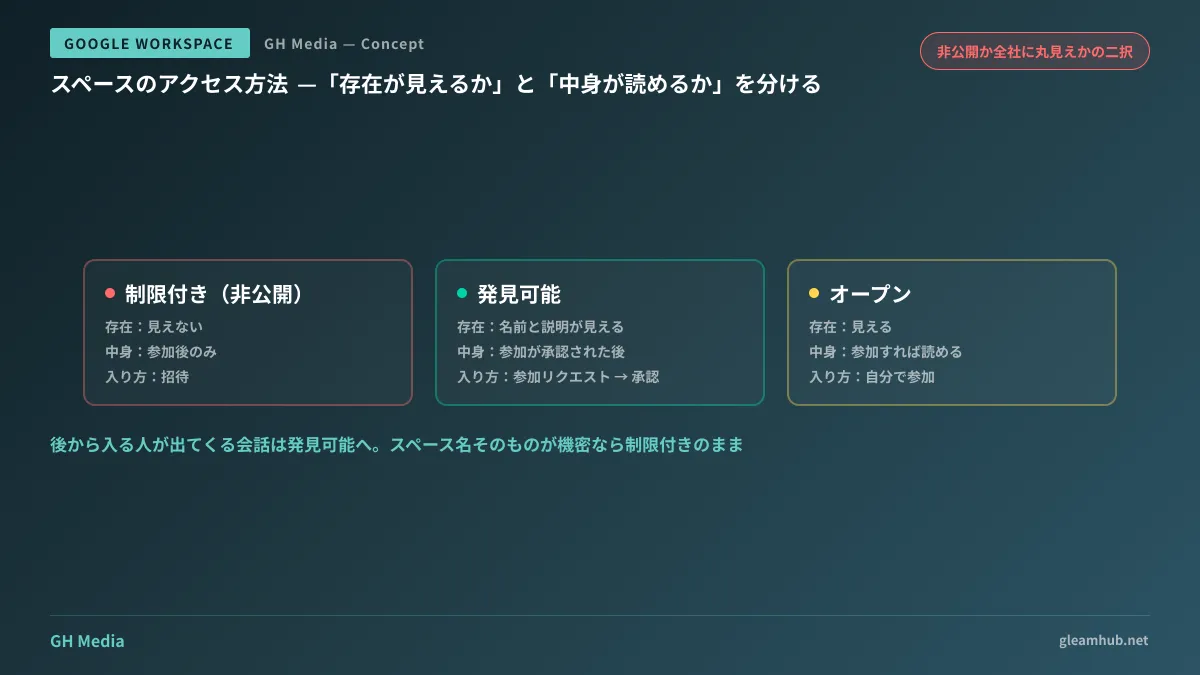
To sum up its behavior in a phrase: people searching for the space can see its name and description, but conversation history remains invisible until membership is approved.
| Access method | Visibility of existence | Readable content | How to join |
|---|---|---|---|
| Restricted (private) | Invisible | Only after joining | Invitation from owner or manager |
| Discoverable | Name and description are visible | After join request is approved | Join request → approval |
| Open | Visible | Readable upon joining | Join directly |
What is critical in the middle row is that “visibility of name and description” and “ability to read content” are decoupled. You can now state: “The space exists. However, what is discussed inside is revealed only after you join.” That was not possible until now.
This is not a bulk setting managed in the Admin Console; rather, space owners and managers modify it directly within space settings. There is no organization-wide enforcement switch for administrators. In other words, even after the feature arrives, nothing changes unless space owners on the ground know about it.
Whether to accept join requests can also be controlled separately. If you want to prevent people who discover the link from requesting entry arbitrarily, you can turn off acceptance of join requests.
Target audiences determine who can discover the space
Once you decide to “make it discoverable,” the next question that arises is: “Discoverable to whom?” Some spaces should be visible company-wide, while others should be visible only to the sales department.
This is where target audiences come in. By creating a target group in advance under "Directory > Target audiences" in the Admin console, you can designate that group on the space side to make it discoverable to those people (Make a Google Chat space discoverable to specific users — Google for Developers).
In smaller organizations, it is common to create and operate with just a single target audience (company-wide). As cross-departmental, sensitive discussions increase, you can consider whether to add target audiences broken down by department or office location.
While it is tempting to simply reuse existing Google Groups, groups for email distribution and audiences for defining visibility scopes serve different purposes. Mailing lists often include people added "just in case," making them far too broad as visibility definitions. You will avoid future headaches by setting them up separately.
How to triage spaces in practice
Just because the feature is available does not mean you should indiscriminately switch existing spaces to discoverable. The moment you make a space discoverable, its name becomes visible to anyone who can search for it. It is not uncommon for the space name itself to be confidential—such as "Company A_M&A Review" or "John Doe_Compensation."
The following three criteria are more than sufficient for triaging spaces.
- Would it be problematic if everyone within scope saw the space name? If so, keep it restricted. This is the first gate
- Is this a conversation where people will need to join later? Spaces for projects, products, and ongoing operational domains generally qualify. Conversely, short-term incident response or specific sales negotiations often do not
- Is there a designated person to approve join requests? If there is no approver, requests will be left unattended, creating a new bottleneck where users say, "I requested access, but never received a reply"
Making spaces that meet the second criterion discoverable significantly reduces the internal problem of "not knowing where discussions are taking place." This is especially effective for spaces dedicated to operational domains that may need to be referenced across departments.
The introduction of this feature also changes how you name spaces. Since the contents are not visible, the name and description are the only information searchers have to judge by. A name like "Project X" conveys nothing. Use names that clearly indicate the domain, subject, and timeframe, such as "[Product] Order Management System Overhaul (FY2026)," and write a one-to-two-line description. That small effort directly translates into discoverability.
High-level decisions on how to align Chat across your organization are covered in Integrating Business Chat, while handling conversations that include external parties is detailed in External Group Conversations in Google Chat. If you want to review basic space operations first, reading the Google Chat User Guide will get you up to speed quickly.
"Being discoverable" is not a loosening of information control
When proposing this kind of configuration change, you may get pushback along the lines of, "Isn't broadening visibility a security concern?" That is an understandable worry, but here the vector is actually the reverse.
Discoverable spaces are an option for closing off open spaces. If you currently have spaces set to open simply because restricted felt "inconvenient," downgrading them to discoverable restricts the visibility of their contents while preserving the visibility of their existence. You can use it both to relax restricted spaces and to tighten open spaces—and for most organizations, the latter is what delivers real impact.
You cannot track the current status of all your company's spaces simply from a list in the Admin console, because individual owners configure their own settings. In practice, a realistic approach is to pick a few top spaces with the highest user counts and check with their owners about their current access settings.
Action items for next week
First, list about ten active spaces in your company and check whether each is set to "Restricted" or "Open." If any are open, verify whether sensitive discussions can safely take place in them. If not, they are prime candidates to be downgraded to discoverable.
Next, establish a simple one-line rule for naming spaces. Just ensure the name conveys the domain and subject matter—that is all it takes. A mechanism designed to help people find spaces without seeing the contents relies entirely on the quality of their names.
If you want to organize your Google Workspace Chat operational rules so they run smoothly even without a dedicated IT team, GleamHub offers free IT and Google Workspace consultations. Because the optimal setup varies depending on your requirements, we provide customized quotes. Please reach out via our contact form.