
"Which folder had last month's quote again?" Every time this message appears in internal chat, someone stops working, searches for the document, and pastes the link. The issue is not that people cannot search; it is that retrieval depends on individual human intervention.
Starting August 26, 2026, the destination for these inquiries in Google Chat changes. Ask Gemini in Chat replaces the Chat side panel, serving as a unified entry point that answers queries by searching across Gmail, Drive, and Calendar.
There is only one thing administrators need to decide in advance: not redesigning access permissions, but determining which services to include as AI search targets. Because this can easily be left running on default settings, reviewing it beforehand is well worth the effort.
Chat turns into the entry point for work
Ask Gemini in Chat is introduced as an integrated command line powered by Workspace Intelligence. Without leaving the chat interface, you can accomplish the following:
- Search across Workspace data, including Gmail, Drive, and Calendar
- Follow conversation threads to catch up on accumulated discussions
- Coordinate schedules and manage tasks on the spot
- Generate images and draft messages directly within conversations
Rollout begins on August 26, 2026, on a gradual release schedule (up to 15 days for feature visibility) for both Rapid Release and Scheduled Release domains. Eligible editions include Business Standard / Plus, Enterprise Standard / Plus, and Google AI Pro for Education.
Crucially, if Gemini in Chat and Workspace Intelligence for all apps are turned on, the feature is active by default. It does not require administrators to manually enable anything extra before it starts working.
Permissions do not change; what changes is whether files get found
To clear up any misconceptions first: this feature does not broaden anyone's access permissions. Files that a user cannot normally open will not surface through Ask Gemini either.
What does change is that files users have permission to view, but had never previously located, will now appear in search results. We discussed this same consideration in When AI search in Drive arrived on mobile. For organizations that have not audited their sharing settings, the arrival of AI search serves as an audit deadline.
Beyond that, the new decision demanded by this feature lies in a different layer.
The toggle unit is the service
In Workspace Intelligence, you can select which Workspace services contribute as data sources for AI. You configure this in the Admin Console by navigating to Generative AI > Gemini for Workspace.
When you turn off a particular data source, generative AI features will no longer actively search for content within it. The key implication here is that this setting does not apply solely to Chat.
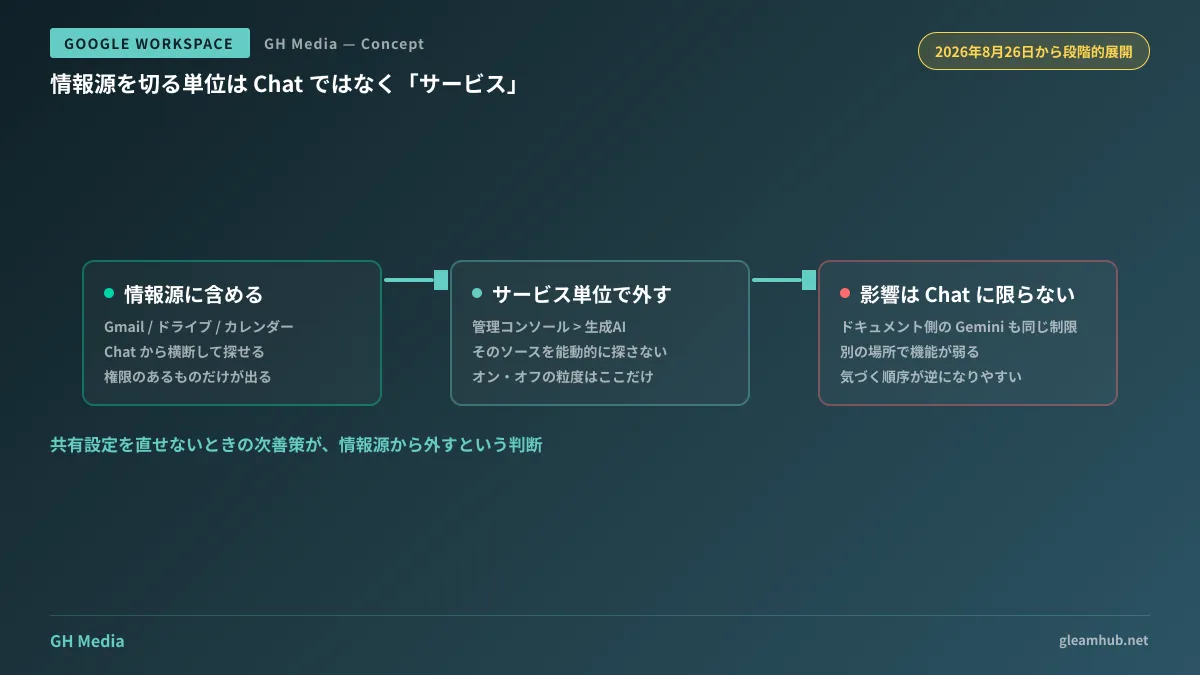
For example, if you decide to exclude Gmail as a data source, that choice affects not only Ask Gemini in Chat, but also how Gemini gathers context in Docs and Drive. Organizations often realize only after disabling a setting due to Chat concerns that they have degraded features they relied on elsewhere.
Structuring your criteria as follows makes the decision much clearer:
| Data source | Common reasons for exclusion | What is lost when excluded |
|---|---|---|
| Gmail | Personal messages, HR, and labor-related communications get mixed in | Use cases tracking "the background on that project" become virtually unusable |
| Drive | Sharing permissions have not been audited | The primary use case—finding documents—disappears entirely |
| Calendar | Event titles include company names or monetary amounts | Automated schedule coordination ceases to function |
Before deciding to disable a service, checking whether its sharing settings can be adjusted first will minimize what you lose. Issues with confidential details in calendar titles can be handled via DLP for Calendar, while Drive link sharing can be resolved through Recovering files distributed to anyone with the link.
Until October 1: a window to measure usage patterns
There is one more time-sensitive factor. Through October 1, 2026, Ask Gemini in Chat features a promotional period with elevated usage limits, designed for trial adoption.
Rather than seeing this period as "getting to use more for free," it is far more practical to view it as "a chance to observe actual usage patterns." When users are constantly constrained by limits, it is impossible to gauge who uses it and to what extent in the first place.
Observing the following areas will prove valuable down the road:
- Is it adopted across departments, or used only by specific individuals?
- Is usage tilted toward "searching" or toward "creating"?
- If search dominates, which services serve as the most effective data sources?
Understanding the third point allows you to curate data sources based on actual usage rather than assumptions. When limits return to standard levels after October, your organization should ideally be in a position where you have drawn a clear line between workflows suitable for integration and those that are not.
The difference in feature rollout timing between Rapid Release and Scheduled Release domains was covered in Choosing to delay release tracks by one week. While both tracks launch on the same day in this case, gradual rollout means it can take up to 15 days before the feature is actually visible.
What to do next
First, open the Admin Console, navigate to Generative AI > Gemini for Workspace > Workspace Intelligence, and record which services are currently enabled as data sources. If left at defaults, Chat will begin utilizing those settings automatically starting August 26.
Next, evaluate exclusions in tandem with a review of Drive and Calendar sharing configurations. Excluding a service as a data source is a fallback for when sharing permissions cannot be rectified. Reversing that sequence simply deprives you of useful capabilities.
GleamHub offers guidance on organizing generative AI settings in Google Workspace, auditing sharing permissions, and improving internal knowledge discoverability through our free IT and Google Workspace consultations. Because the approach varies based on your environment's scale and operational setup, please consult with us individually. Feel free to reach out via Contact Us.
Sources
- Introducing Ask Gemini in Chat: your new partner in productivity — Google Workspace Updates
- Control Workspace Intelligence for generative AI features — Google Workspace Admin Help
- Introducing Workspace Intelligence, with admin controls — Google Workspace Updates
- Google replaces Chat side panel with new Ask Gemini integration — Neowin





