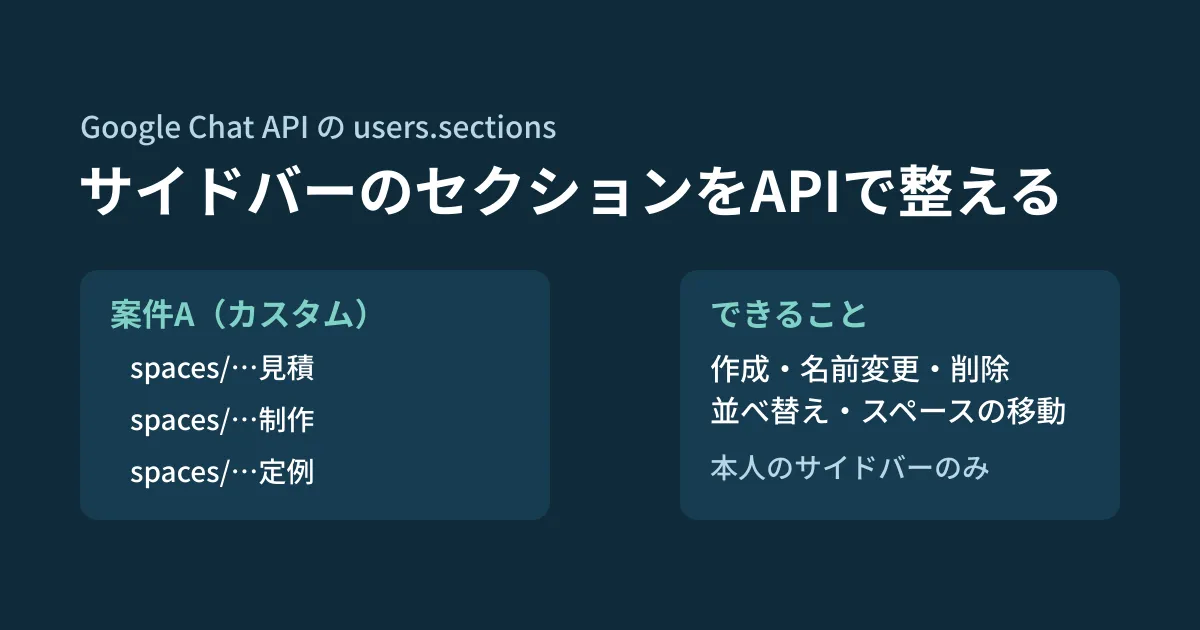
If you create Google Chat spaces for each project and each client, dozens of spaces pile up in the sidebar. Members who newly join a project have to start by searching for which ones they are responsible for. Chat has "sections" that group spaces under any name you like, but creating and arranging them is manual work for each person.
The Google Chat API has a resource called users.sections that handles these sections. It includes operations to create, rename, delete and reorder sections, and to move spaces between sections. The Chat API release notes announced it as a developer preview on December 11, 2025, and as generally available (GA) on April 1, 2026. Based on the release notes, the guides for sections, the reference and the Chat API Discovery document (the machine-readable definition of the API, revision 20261013), this article sorts out how it works and its limits.
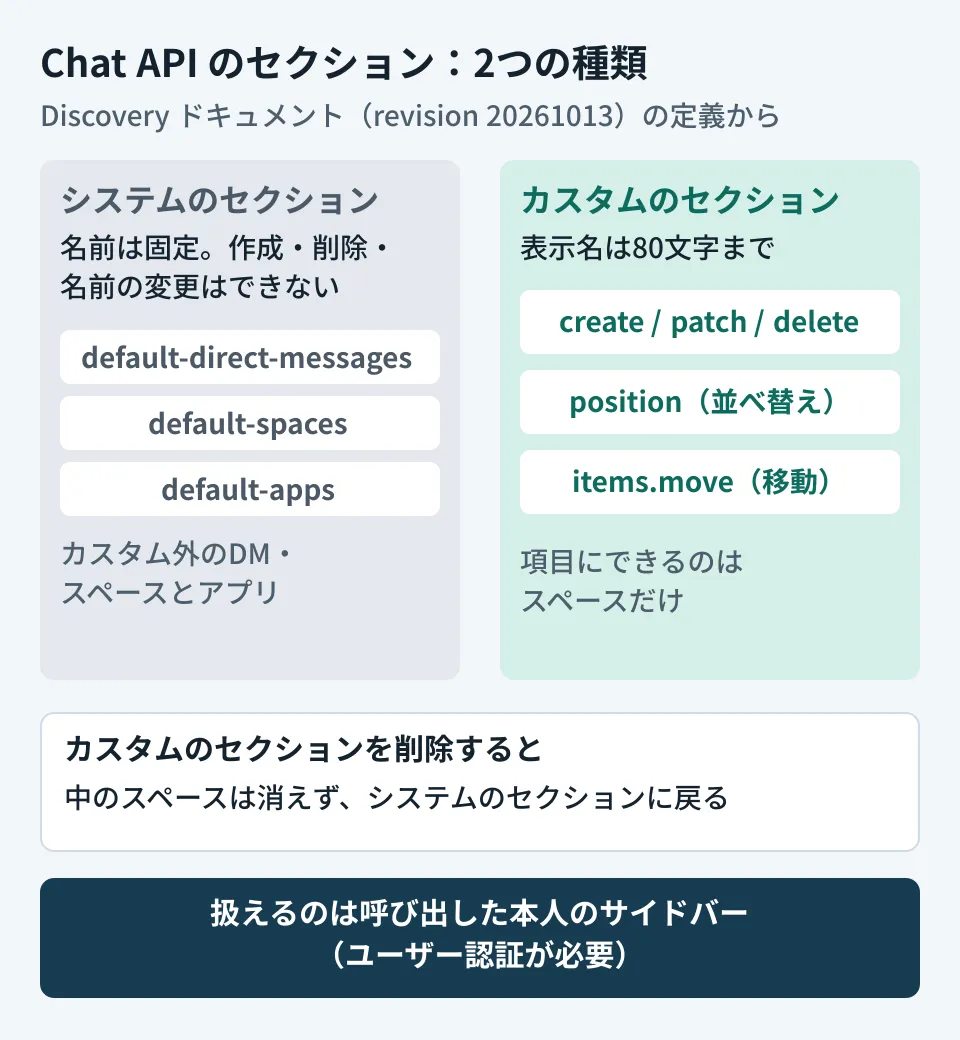
Only the caller's own sidebar can be handled
Sections are a per-user resource. The resource name takes the form users/{user}/sections/{section}, and the description of list, which lists them, says it "only supports listing the calling user's sections." Each method requires user authentication. The guide's prerequisites list a Business or Enterprise Google Workspace account with access to Google Chat. There are two scopes.
chat.users.sections: view, create, update and delete sections, and move and list items within sectionschat.users.sections.readonly: view sections and their items only
Assume this is not a feature for administrators to push the same sections to everyone's sidebar. To "prepare a Project A section for people who join Project A," you would build it as a script or app that the user runs with their own permissions. The editorial team has not checked whether it can be run on behalf of others using domain-wide delegation.
System sections and sections you create
By definition, sections fall into two types.
- System sections: provided by Chat. Their names are fixed, and they cannot be created, deleted or renamed
default-direct-messages: direct messages and group chats not in a custom sectiondefault-spaces: spaces not in a custom sectiondefault-apps: installed apps
- Custom sections (
CUSTOM_SECTION): created by users. Only this type can be created, renamed and deleted
When creating a custom section, a display name (displayName) is required, up to 80 characters. display_name is also the only field that renaming (patch) can update.
By definition, only spaces can be placed in a section ("Only spaces can be section items"). A space here means the API's spaces resource, and direct messages and group chats are also treated as types of spaces (DIRECT_MESSAGE and GROUP_CHAT). The Help Center also explains that direct messages can be moved into sections.
How to move spaces, and what happens on deletion
To move a space to another section, use users.sections.items.move. What you move is an "item within a section," so first find out which section the space is currently in. With items.list, you can search across all sections by using the wildcard - for the section and narrowing with space = spaces/{space}.
The order of sections is changed with position. You specify either an absolute position (1 or higher) with sortOrder, or the start (START) or end (END) with relativePosition. The section that was at the specified position and those after it each shift back by one.
The description of deletion (delete) includes the following sentence.
If the section contains items, such as spaces, the items are moved to Google Chat’s default sections and are not deleted.
Deleting a section does not delete the spaces in it; they return to the system sections. Even if you build a process that cleans up sections for finished projects, it does not affect the spaces themselves or their messages.
An example script run by the user
From here on is the editorial team's suggestion. One approach is that a member who joins a project runs it once with their own account, and it gathers the project's spaces into one section placed at the top. The editorial team type-checked the following code against the type definitions of @googleapis/chat 51.2.0 for Node.js and ran it with the API endpoint pointed at a local stub (a test server that returns fixed responses). We did not connect to an actual Google Chat.
import { chat_v1 } from "@googleapis/chat";

export async function groupSpaces(chat: chat_v1.Chat, displayName: string, spaces: string[]) {
  const { data: section } = await chat.users.sections.create({
    parent: "users/me",
    requestBody: { displayName, type: "CUSTOM_SECTION" },
  });
  for (const space of spaces) {
    // スペースが今どのセクションにあるかを、全セクション(-)から探す
    const { data } = await chat.users.sections.items.list({
      parent: "users/me/sections/-",
      filter: `space = ${space}`,
    });
    for (const item of data.sectionItems ?? []) {
      await chat.users.sections.items.move({
        name: item.name!,
        requestBody: { targetSection: section.name! },
      });
    }
  }
  await chat.users.sections.position({
    name: section.name!,
    requestBody: { relativePosition: "START" },
  });
  return section;
}
The requests that reached the stub were POST /v1/users/me/sections, then GET /v1/users/me/sections/-/items?filter=space = spaces/... and POST .../items/{item}:move for each space, and finally POST /v1/users/me/sections/{section}:position.
Before actually using it, decide on the following points.
- Do not create duplicate sections with the same name. Before creating, check with
listthat there is no custom section with the same name.listreturns up to 10 items when omitted and up to 100 at most, so people with many sections need pagination - Make the user a member of the spaces first. The targets to move are items in the user's own sidebar, and in the example above, spaces not found with
items.listare skipped without doing anything. Since we have not checked what is returned for spaces the user is not a member of, finish adding them to the spaces first, for example with automatic space creation - Do not break the existing arrangement. Spaces already in sections the user created are also moved by
items.move. Design it so the user can choose whether overwriting is OK
Ways to make project information easier to find with the Chat API are covered in message search and pinning. For the "Meetings" section added to the Chat sidebar by default, see Google Chat introduces a new "Meetings" section. Note that as of October 19, 2026, the API's section types (type) have no value corresponding to meetings. We have not checked how it appears from the API.
When it became available
The Chat API release notes announced that it was released as a developer preview (for those registered for early access) on December 11, 2025, and became generally available (GA) on April 1, 2026. Among client libraries, the definition bundled with the Python client (google-api-python-client) supports it from revision 20260405, and @googleapis/chat for Node.js from 44.7.0, released on May 20.
Scope of verification
On October 17, 2026, we retrieved the Google Chat API Discovery document (revision 20261013) and checked each method of
users.sectionsandusers.sections.itemsand the definitions ofGoogleChatV1Section,SectionItem,PositionSectionRequestandMoveSectionItemRequestin the original. We confirmed when they were added by comparing the type definitions of@googleapis/chat44.6.0 and 44.7.0 on npm with the definitions bundled with google-api-python-client 2.193.0 and 2.195.0 (document research). We also type-checked the code example with@googleapis/chat51.2.0 and ran it against a local stub. On October 19, 2026, we opened the Chat API release notes, each guide for sections (create, delete, list, list items, move and reorder), theusers.sectionsreference and the Help article "Create & organize sections in Google Chat," checked the release stages and dates, the required account and the handling on deletion, and reflected them in this article. We have not tested how it appears in the actual Chat UI.
For running Google Chat spaces or building ways to share information by project, contact us through our free IT and Google Workspace consultation.