An integration with a group company was decided, shifting IT systems toward the parent company. Or perhaps a decision was made to reduce licenses following a price increase. Whatever the reason, discussions around canceling or downsizing Google Workspace are characterized by a short window between initial consideration and execution.
The question that inevitably arises is: "What happens to our past emails and files?" The departments most distressed when past 10-year email searches become unavailable are typically accounting and legal.
Even without plans to cancel, this question will come up. On the day a departing employee's account is suspended, the exact same decision needs to be made on a smaller scale.
There are three methods referred to as "exporting"
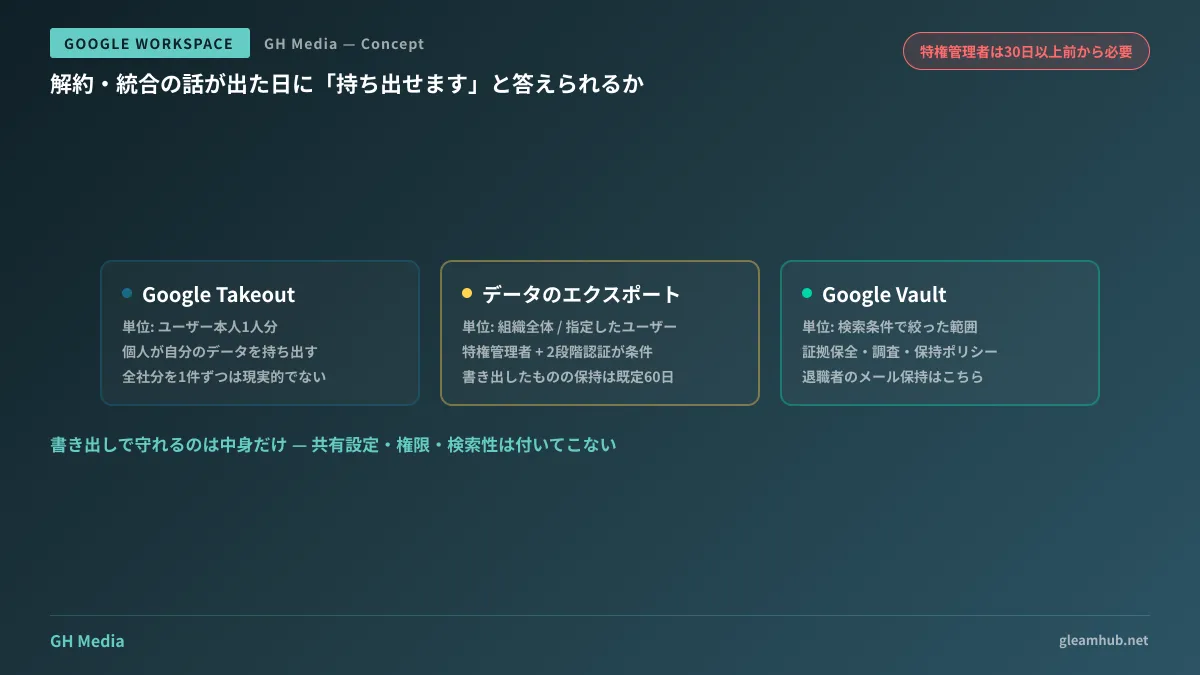
There are three ways to extract data from Google Workspace with similar names but entirely different roles. Planning without distinguishing between them will leave you missing critical data on the day of execution.
| Approach | Units | Primary use case |
|---|---|---|
| Google Takeout | Data for a single user | An individual exporting their own data |
| Data export (Admin Console) | Entire organization / Specified users | Bulk evacuation prior to cancellation, company-wide backups |
| Google Vault | Scope filtered by search criteria | Litigation response, investigations, applying retention policies |
Takeout is an individual user operation. While it can be used to extract data for a single departing employee, running it manually for an entire company one user at a time is unrealistic.
The Admin Console's "Account > Data Export" handles bulk exports for the entire organization. Previously, only the entire organization could be selected, but it is now possible to export data targeted at specific users as well.
Vault is of a different breed. Its purpose is evidence preservation and searchability, making it suitable for retaining emails of departed employees. Companies already utilizing Vault should design this alongside Retaining departed employee emails and eDiscovery.
Bulk export has prerequisites that cannot be met on the day of
Bulk exports from the Admin Console have several prerequisites defined by Google. The troublesome part is that some of them belong to the category where "preparing starting today will still be too late."
- Must be a super administrator account that has existed for 30 days or more (exceptions apply if the organization itself was created less than 30 days ago)
- 2-Step Verification must be enabled on that account
- Organizations with over 1,000 users and those with FedRAMP certification must contact Google Workspace Support prior to execution
The first requirement is critical. If you hurriedly create a new super administrator account after deciding to cancel, you will have to wait 30 days. Deleting a predecessor's account during handover and immediately receiving cancellation notices right after creating a new one is a sequence of events that genuinely happens.
There is also a limit on the retention period for exported data. By default, it is up to 60 days, and keeping it beyond that requires selecting a custom export specifying a Cloud Storage bucket owned by your organization. The procedure does not end at "we exported it, so we're safe"; it includes "where we move the exported data."
Even if you extract it, you cannot restore it as-is
Even assuming you export it without incident, format issues will hit next. You will get the data out, but the original usability does not come along with it.
Emails are exported as files in formats such as mbox. While all contents are included, searching for "who exchanged what regarding that project two years ago" requires a separate environment capable of reading those files. If your destination is another email service, you can import them, but if you are merely archiving, it risks becoming just another unsearchable archive.
Drive files require even greater caution. In an export, Google-format files are converted into other formats. Files involving spreadsheet formulas or scripts will not behave the same way after conversion. Furthermore, sharing settings, permissions, and comment histories are separate from file contents. Information regarding who could view which file cannot be reproduced simply by exporting the files.
In other words, what an export protects is the "content," not the "operations." Unless you distinguish between these when explaining, management will understand that "all data has been preserved," while staff on the ground will complain that "we can't search for anything."
Email addresses stop working before data does
In practical cancellation tasks, custom domain handling becomes an issue before data does. When you cancel Google Workspace, Google stops accepting emails addressed to that domain. If you reach the cancellation date without preparing a destination environment, emails from clients will start bouncing as undeliverable from that very day.
The proper order is to switch the inbound routing to the new environment, verify it is operational, and only then shut down the old environment. The migration process itself is summarized in Email server migration. Make sure to include data export and email destination cutover as distinct tasks in your project plan.
A 30-minute verification you can do today
Before drafting an elaborate plan, there are things you can verify right now.
First, check when your company's super administrator account was created. You can verify in the Admin Console immediately whether it satisfies the 30-day requirement and whether 2-Step Verification is active. If not, addressing that today adds an option for your future.
Second, export just one user's data and actually open it. It does not need to be company-wide; seeing firsthand how emails and Drive files appear locally will sharpen your understanding of what "extractable" actually means. Whether you realize here that "this isn't searchable" will determine how much panic occurs on cancellation day.
Third, ask departments what truly needs to be preserved. Keeping everything is the most expensive path. There is a distinction between items with statutory retention requirements (contracts, accounting records), items practically helpful for operations (past estimates), and items that can be discarded without issue. If conducting a license inventory at the same time, please also check Reviewing Google Workspace license costs.
What to do next
First, verify your super administrator account's creation date and 2-Step Verification status today. This takes only five minutes and clears the waiting period in advance if prerequisites are not met.
On top of that, run an export for a single user once. Being able to execute the export and being able to read what comes out are two different things. If you verify these two items, you will be able to answer with confidence that "it can be extracted" whenever cancellation or integration discussions arise.
At GleamHub, we assist with data migrations accompanying Google Workspace transitions or cancellations, email environment cutovers, and operational design for departed employee accounts through our free IT and Google Workspace consultations. Since the approach varies depending on data volume and the target destination, please reach out for an individual consultation via Contact Us.