"The caption around 1:20 still shows our previous pricing." When you ask for a review of a training video, you might receive five comments like this in an email. You open the video, drag the seek bar to roughly that spot, check it, fix it, and send it back. Once you pass ten comments, nobody knows what has been fixed and what remains open.
The exact same thing happens when reviewing a corporate intro video commissioned from a production studio or updating internal video manuals. The reason is evident: videos do not have line numbers. In a document, you can simply anchor a comment to the exact text. With video, however, feedback gets translated into verbal timestamps like "at X minutes Y seconds," eroding precision along the way.
The dynamic where feedback gets separated from the content
When reviewing documents, feedback stays directly inside the file. You can see at a glance who wrote what, where, and whether items are resolved.
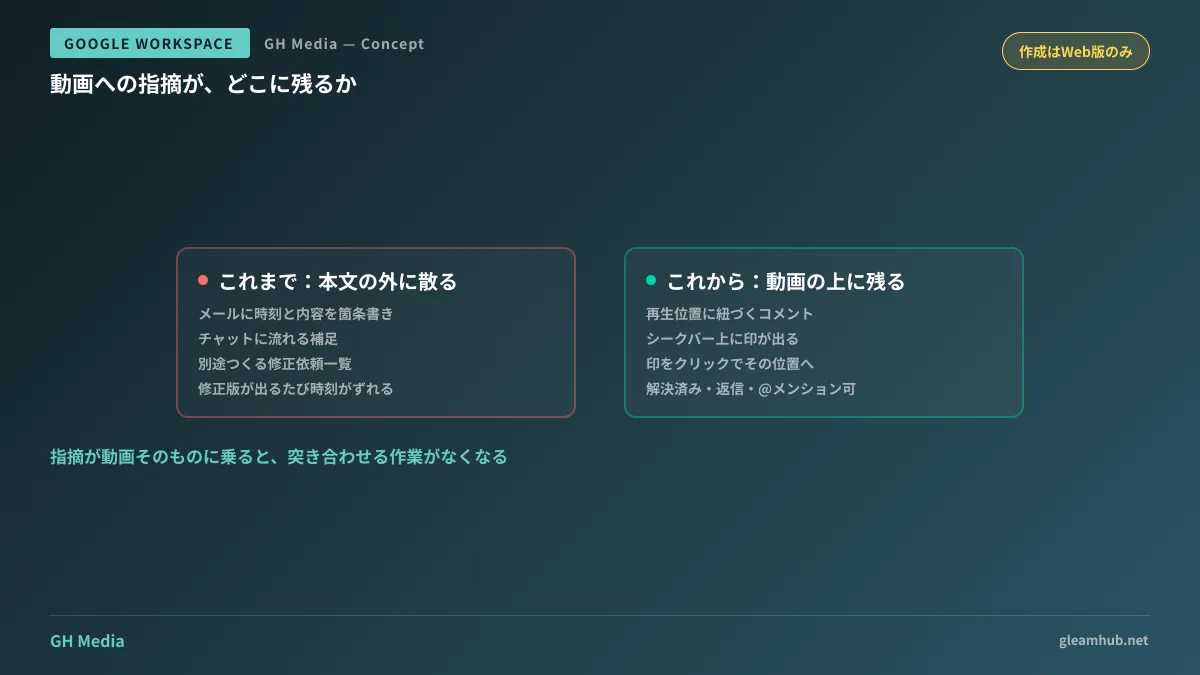
Videos lacked this capability. As a result, feedback ends up scattered across places like:
- Bulleted lists of timestamps and notes in email bodies
- Follow-ups in chat beginning with "Regarding earlier..."
- Separate "Revision Requests" spreadsheets
- Verbal instructions during meetings (with no documentation)
While spreadsheets might look organized at first glance, the moment the reviewer has to cross-reference between the video and the table across two screens, their operational overhead is not reduced. Furthermore, every time a revised cut is delivered, timestamps shift, rendering the numbers in the table obsolete.
Comments can now be pinned to specific playback positions
You can now add timestamped comments directly to videos in Google Drive. A phased rollout began on August 3, 2026 (Google Workspace Updates).
The functionality works as follows:
- In the comment panel, choose between a timestamped comment tied to playback position or a file-level comment
- Timestamped comments appear as markers on the video player's seek bar
- Clicking a marker jumps the video to that exact point and highlights the corresponding comment
- Editing, replying, marking as resolved, and @mentioning work identically to traditional comments
In essence, feedback now lives directly on the video itself. There is no longer any need to say "around 1:20" verbally; reviewers can simply work through each seek bar marker sequentially.
Two constraints you should know upfront
While this feature is convenient, there are key caveats to understand before folding it into operations.
Timestamped comments can only be created in the web interface. When viewing videos via smartphone or tablet apps, these comments appear as standard file-level comments. The idea of quickly dropping feedback while commuting will not work as expected. It is safest to assume that in-depth reviews should still be performed from a computer.
Another note for IT administrators: this feature lacks administrative controls. It is enabled by default for all users, across all Google Workspace editions as well as personal Google accounts. If your organization operates under a policy of "validating features internally before rolling them out," this change arrives without waiting for validation. Since there is no setting to disable it, the only recourse is notifying users in advance.
Focusing on workflows where it makes the biggest impact
Simply announcing that "you can now comment on videos" will not drive adoption internally, so target specific workflows. Here is where it pays off in practice:
| Scenario | Previous bottlenecks | What changes |
|---|---|---|
| Updating internal training and manual videos | Creating separate revision lists each time policies change | Markers remain anchored directly to relevant timestamps |
| Video reviews with external production studios | Cross-checking timestamps in revision requests against the footage | Eliminates the need to create separate revision request sheets |
| Reviewing recorded sales pitches | Feedback like "let's rephrase that" gets lost in verbal discussion | Actionable feedback is preserved as an audit trail |
The first use case is particularly impactful. In companies that produce training videos in-house, reviewing what needs fixing across which videos occurs whenever regulations or pricing structures change. If this can be handled entirely via on-video comments, the inventory spreadsheets compiled for every update become completely unnecessary. For guidance on producing videos internally, see Should You Transition to In-House Production for Training and Manual Videos with Google Vids?; for camera-free workflows, see Avatar Features in Google Vids.
More comments expose storage location problems
Here is a prerequisite that must be addressed first: where that video is stored.
Timestamped comments attach directly to the video file. By extension, if that video sits in an individual staff member's My Drive, all comments become their personal property as well. If that employee resigns, access is severed, and the entire review trail is lost. We detailed how this same issue affects meeting recordings in Before Meeting Recordings and Notes Accumulate in Individual Drives.
By carrying comments, videos transform into assets with embedded operational history. That is why you should move them to shared drives before adopting them into regular workflows. Doing this in reverse order ensures that valuable operational history ends up trapped in personal storage spaces.
Taking one initial step is plenty: tally whose drive currently holds the training and explainer videos updated over the past year. If more than half reside in personal My Drives, fixing the storage location will yield far greater benefits than learning feature mechanics.
Whether you want to organize internal asset storage including video files or review Google Workspace operational policies, GleamHub offers free consultations for IT and Google Workspace. Because optimal configurations vary based on requirements, we provide customized estimates. Please reach out via Inquiries.