
When internal standard operating procedures are updated, how do you notify staff? In many companies, it ends with a chat message saying "The manual has been updated. Please review such-and-such in Drive." Then, months later, someone is discovered performing the task using the outdated method.
The employee harbors no ill intent; they did not skip reading, but simply stopped at the assumption that they understood. Comprehension checks are the sole mechanism to detect this gap, yet few companies implement them. When asking coordinators why, the answer is usually the same: "It is not that writing questions is troublesome; rereading the manual and identifying what should be tested is what feels overwhelming."
The true burden, in other words, is not drafting questions, but rereading source material and converting it into test questions. The updates introduced to Google Forms target precisely this pain point.
Drive contents can now be designated as source material
"Help me create" in Google Forms now supports quiz generation. When prompted with instructions for the quiz you want to create, Gemini builds a quiz-formatted form including questions, answer choices, and the correct answer for each item.
Crucially, files stored in Drive can be referenced as source material within that prompt. By specifying Docs, Slides, or PDFs, questions aligned with their content are generated. Prompts such as "create a 10-question quiz testing common pitfalls from the new-hire expense reimbursement manual (this document)" will work smoothly.
Generated question formats support radio buttons, checkboxes, multiple-choice grids, and more, outputting forms fully preconfigured with quiz settings, including designated correct answers.
The rollout is phased, deploying gradually from July 24, 2026 for Rapid Release domains and August 5 for Scheduled Release domains. Because features can take up to 15 days to appear in the UI, even if not visible today, it may arrive in a few days. Avoid assuming your domain lacks it; recheck across the coming week.
Which release track your organization belongs to is configured in the Admin console. Navigating the Admin console, including verifying release tracks, is detailed in Introduction to the Google Workspace Admin Console.
Distributing as-is spreads incorrect answers across the company
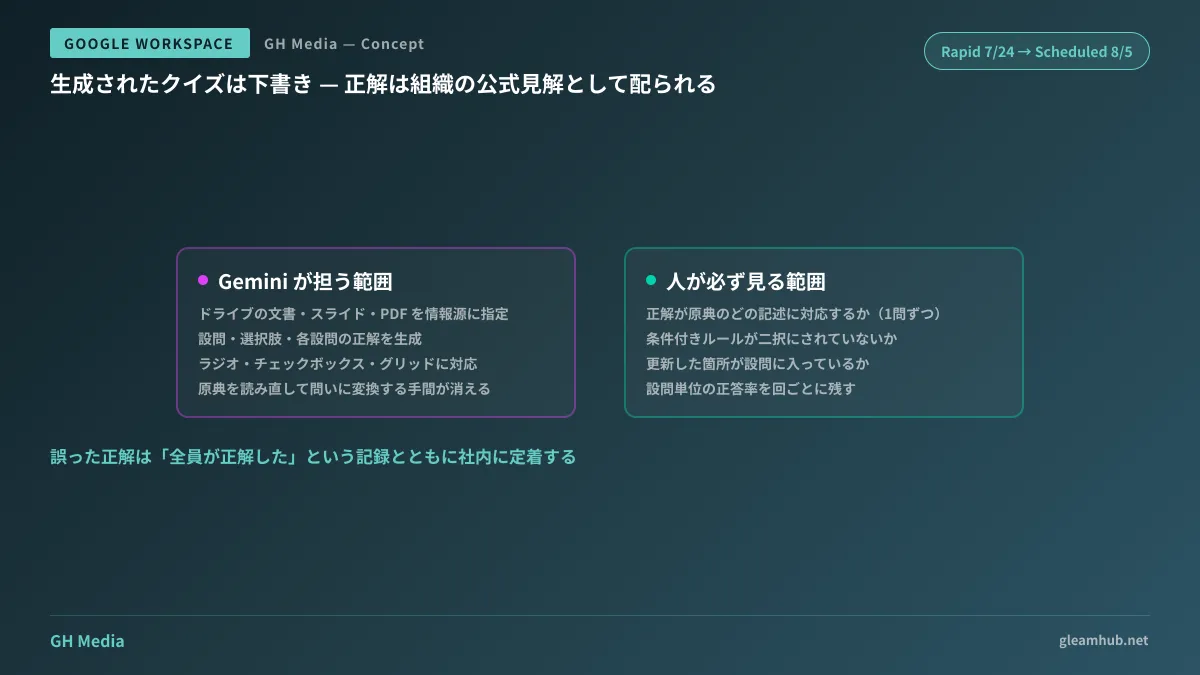
This is the single most critical operational point: generated quizzes are drafts, not finished deliverables.
Where comprehension checks differ critically from other AI deliverables is that correct answers are distributed as the organization's official stance. Slightly awkward question phrasing causes no practical harm, but if designated answers diverge from source materials, employees memorize that divergence as what the company declared correct. Furthermore, training records will show that everyone answered correctly, preventing anyone from realizing the error has taken root.
Before distributing, ensure a human verifies at least the following points:
- Verify question-by-question which statement in the source text corresponds to the correct answer. Questions where the source paragraph cannot be identified may not actually be supported by the text
- Check whether items with exceptions have been reduced to binary choices. Turning conditional manual rules into simple true/false questions invariably renders one side false
- Confirm that updated sections are actually tested. If the goal is communicating workflow changes, the questions are meaningless unless they test those changes. Generative AI samples evenly across the entire source material, occasionally omitting the changes
The philosophy of inspection when treating AI outputs as work deliverables is also covered in Quality Assurance for AI Deliverables: Lessons From EY's AI Report Errors. While comprehension checks are easily overlooked because they stay internal, they exert long-term effects by cementing inaccuracies inside the company.
Where it works and where it does not
This feature shines in training where source materials exist as text within Drive. Conversely, it cannot be applied to operations that exist solely as tacit knowledge.
Realistic examples where it works well include the following:
- Onboarding — Employment regulations, expense reimbursements, and internal approval rules; areas where documentation is solid and the same material is taught annually
- Security training — Phishing responses, password management, and data handling; adds verification of actual reading to otherwise perfunctory annual training
- Communicating procedural changes — Specifying diff documents before and after revisions makes it easier to generate questions targeted specifically at the changes
On the other hand, when relying primarily on video manuals, designating them as source materials is difficult, necessitating separate scripts or supplementary documents. Creating video manuals is covered in Creating Internal Video Manuals With Google Vids.
Everyday operational use of Google Forms (aggregating responses, Google Sheets integration, notifications) is covered in Google Forms Business Practical Guide, while Gemini features for survey design are detailed in Gemini Question Suggestions in Google Forms.
Documenting "understood" rather than merely "completed"
The true value of introducing comprehension checks does not lie in the test scores themselves. It lies in identifying which specific questions saw company-wide concentrations of errors.
When a question shows an extremely low correct answer rate, what should be questioned is not employee comprehension, but how the manual was written. If everyone is stumbling on the exact same point, that serves as evidence that the source document's description is ambiguous. If you can establish a cycle where the manual improves each time training is conducted, quizzes transform from measuring instruments into mechanisms for improvement.
To achieve this, you need to retain the spreadsheet aggregating the results for each session, keeping it in a format where you can review the correct answer rate on a per-question basis. Form responses can be exported to a spreadsheet, so you can set this up without any additional tools.
What to do next
First, choose just one document within your company that is currently operated under a "please read this" approach. If you try to tackle everything at once, you will never get started. It is best to choose whatever would cause the most trouble if an incident occurred, such as expense reimbursement procedures or information handling rules.
Generate a quiz using that single document, cross-check the correct answers against the original text, and distribute it. Once you run through this process once, you will have an estimate of the time required when expanding to other documents.
If you would like to consult on anything from organizing internal manuals to designing training operations, we accept inquiries through GleamHub's Free IT & Google Workspace Consultation. Because realistic approaches vary depending on document volume and organizational structure, please reach out for an individual consultation. Feel free to contact us via Contact Us.
Sources
- Use Gemini in Google Forms to quickly create a new quiz — Google Workspace Updates
- Google Workspace Weekly Recap - July 31, 2026 — Google Workspace Updates
- Create a form with Gemini in Google Forms — Google Docs Editors Help
- Generate questions with Gemini in Google Forms — Google Docs Editors Help
- Review new releases — Google Workspace Admin Help




