
When looking at internal operational video manuals, it is common to see button placements on screen that differ from how they look today. They were created three years ago. While the written procedure has been revised several times, no one has touched the video. New hires try to follow the video, get stuck halfway through, and come ask senior colleagues for help.
Videos become outdated not because creating them is difficult, but because updating them is difficult. Where text takes only a single rewritten line, video requires re-recording narration and editing footage. Consequently, nobody touches them, and they remain as they are.
On September 2, 2026, Google Vids added a feature to convert Google Docs, PDF, and Word files into summary videos. AI generates the script and narration, and pairs them with visuals. What makes this change impactful is not simply that creation is now possible, but that videos can now be regenerated from the source document.
What the New Capability Enables
The supported inputs are static Docs, PDF, and Word files. Feeding these in generates a summarized script, narration, and matching video. The primary intended targets are text-heavy materials such as training documents, lengthy reports, and meeting minutes.
Rollout has already begun for Rapid Release domains, and proceeds gradually over up to 15 days starting September 5, 2026, for Scheduled Release domains. Eligible editions cover a wide range including Business Starter / Standard / Plus, Enterprise Starter / Standard / Plus, Education Plus, and Google AI Plus / Pro / Ultra, putting it within reach even for companies currently evaluating whether Vids is available on their plan in the first place.
When creation becomes cheap, update design is what matters next
Everything discussed so far is an extension of deciding whether to switch training videos from outsourcing to in-house production. However, the introduction of document conversion adds a new discussion point.
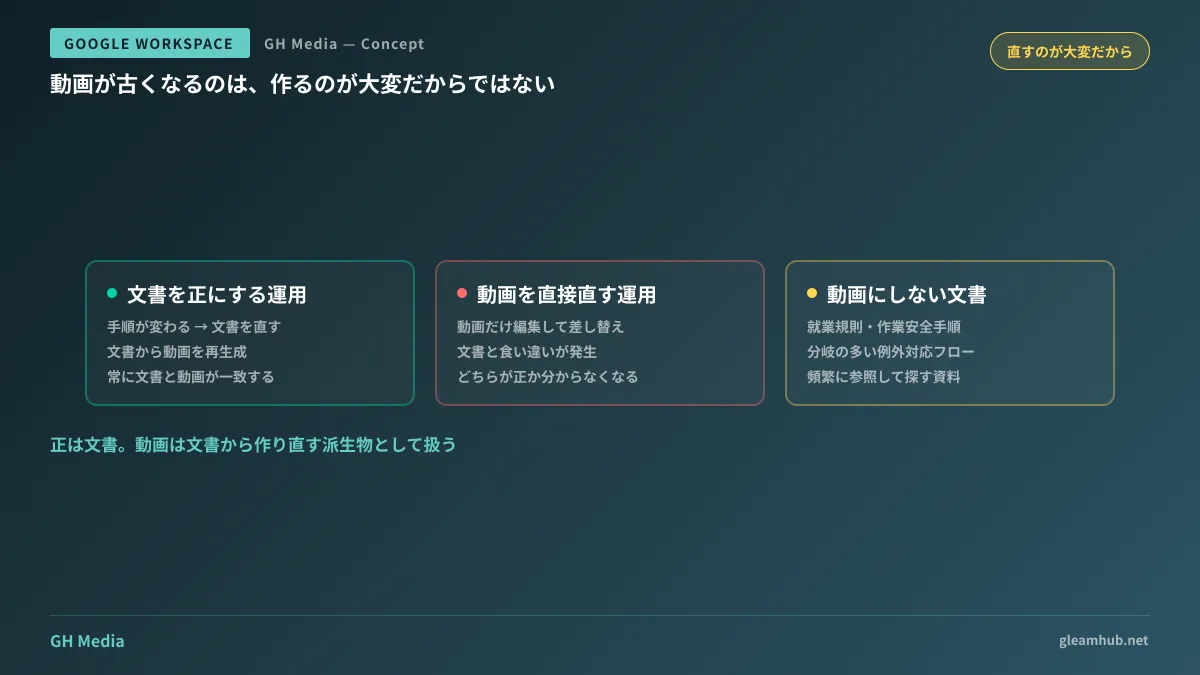
Previously, in-house production meant asking, "Can we handle the work of assembling videos from scratch internally?" What this change altered is that videos have become derivatives of documents. If you modify the original document and rerun the conversion, a new video is produced. There is no need to edit the video itself.
This distinction changes the structure of operational rules. There is only one principle to uphold:
The document is the authoritative source. Treat the video as a derivative generated from the document.
Establishing this principle prohibits modifying only the video first. When procedures change, update the document, then regenerate the video. The moment this order is inverted, no one knows whether the document or the video is correct. This shares the same structure as organizing documents as deliverables.
Documents suitable for video conversion, and those better left as text
The evaluation criterion is not clarity, but update frequency and the severity of damage when errors occur.
| Document characteristics | Video conversion | Rationale |
|---|---|---|
| Changes only about once a year (company overviews, system summaries) | Suitable | Slow obsolescence rate |
| Involves on-screen operations with frequent UI changes (SaaS operating procedures) | Conditional | Only if rerun conversions can be built into operations |
| Involves compliance, contracts, or safety (work regulations, workplace safety procedures) | Unsuited | Actual harm occurs if conditions are dropped during summarization |
| Many decision branches (exception handling workflows) | Unsuited | Videos are difficult to skim or search |
The third and fourth rows are critical in practice. Summarization is a process that discards information. Only the person who wrote the original document can judge whether discarded information was safe to omit, so rather than distributing generated videos as-is, you must preserve a review step where someone familiar with the original document watches it through once.
Furthermore, video is a format where searching for "where in these 20 minutes it is written" is difficult. For materials referenced frequently, keeping them in a searchable document format resolves issues faster on the ground. Video is effective for content meant to be watched all the way through just once at the beginning.
Rules for putting it into operation
If you are already running explanatory videos with Vids, there is not much more you need to decide.
- Always place a link to the original document in the video description. Create a return path to the latest version for viewers.
- Include the generation date inside the video. Whether at the beginning or end does not matter. Merely knowing as of when the content is accurate reduces incidents of relying on outdated videos.
- Designate who is responsible for recreating the video when the original document is updated. If this remains unassigned, you ultimately end up with three-year-old videos.
Item 3 is a matter of role division, not mechanisms. Companies where the person updating documents and the person regenerating videos are different individuals are precisely where videos get left behind.
What to do next
Count the explanatory videos used in your company and check whether the original documents they were based on still exist. If they do not exist, those videos cannot be updated. Setting a rule that the next remake will be built from a document is the starting point.
Then, check where the materials you are currently planning to turn into video fall in the table above. If they fall under "compliance, contracts, or safety," the decision is to keep video as supplementary material and retain the document as the authoritative source.
At GleamHub, we offer free IT and Google Workspace consultations regarding organizing internal knowledge, designing manual workflows using Google Workspace, and building structures where updates never stall. Because the approach depends on how your documentation is currently managed, please contact us via Contact Us.




