
Three employees use Gemini to draft quotation emails, producing three distinct styles of copy. One is overly polite and verbose, one is curt and lists only requirements, and one is just right. The prompt producing that just-right email exists solely inside that person's personal notes.
This is the most common reality in organizations roughly six months after introducing generative AI. The tool was distributed to everyone, but tangible results are limited to individuals who took the initiative to refine how they use it.
Prompt collections are usually left unused
The first countermeasure companies usually attempt is a "prompt collection." Compiling top performers' instructions into a document and sharing it with the entire team looks like a great initiative at launch.
However, checking back three months later reveals nobody is using it. The reasons are straightforward:
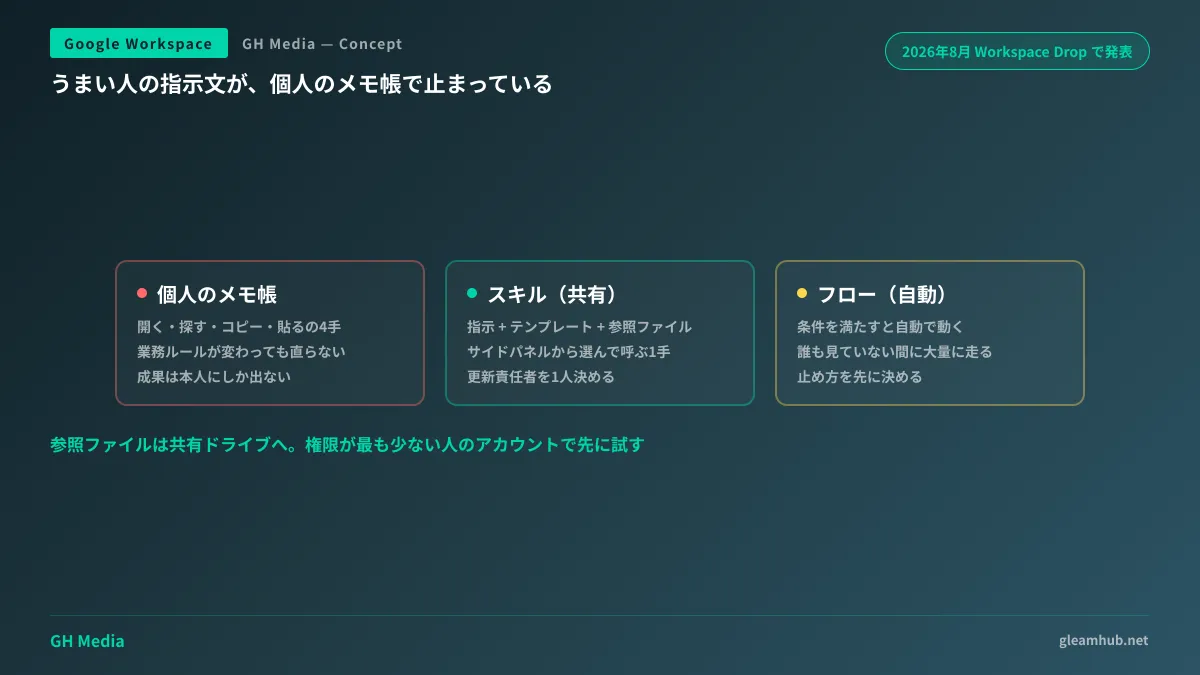
- It takes four steps: open, search, copy, and paste. Writing it yourself on the spot is faster.
- When business rules change, the shared document is not kept up to date.
- Titles alone fail to make it clear which instruction fits which specific situation.
In short, as long as prompts are distributed as documentation, usage remains dependent on individual motivation. While effective instruction writing is outlined in Prompt structures for Gemini in business workflows, knowing the structure and driving organizational adoption are two entirely different challenges.
"Skills" announced in the Workspace Drop
In the August 2026 Workspace Drop, Google announced "Skills" as a new feature within Workspace Studio. They are positioned as reusable prompts.
Skills are designed to package not just instructions, but also the following components together:
- Team rules (phrasing preferences, prohibited expressions, salutation styles, etc.)
- Templates (proposal or contract outlines, email layouts)
- Reference files (past project deliverables, pricing methodologies, product specifications)
Once created, Skills can be shared and invoked directly from the Workspace side panel. Target use cases include aligning email and document phrasing with brand standards, standardizing proposal and contract templates, and streamlining routine tasks like status updates.
The four steps mentioned earlier (open, search, copy, paste) are replaced by a single step: select and invoke. That is the only difference, but it is precisely what determines sustained adoption.
Flows and Skills fail in different ways
Workspace Studio already includes "Flows." Because having both can cause confusion, let us draw a clear line between them.
| Flows | Skills | |
|---|---|---|
| Launch | Runs automatically when conditions are met | Runs when triggered by a human |
| Best suited for | Notifications, data transfer, aggregation, routing approvals | Drafting, summarization, drafting copy, formatting |
| Output handling | Passes directly into subsequent automated steps | Reviewed and refined by a human before use |
| Failure mode | Executes in bulk while no one is watching | Little tangible harm if the output is not adopted |
Automated mechanisms require determining how to stop them before launching. Flows involve questions of execution actor logging and revoking credentials, as discussed in When the actor in audit logs is no longer necessarily human and Managing flows with external steps.
Skills, by contrast, are triggered by a human and reviewed by a human. When getting started, Skills carry far lower operational risk—that is the practical conclusion for your adoption sequence.
What should and shouldn't be turned into a Skill
If you turn everything into a Skill, you recreate the problem where nobody knows which Skill to use—the exact same trap that doomed prompt collections.
Skills are best suited for tasks meeting the following criteria:
- Occurs multiple times a month (for annual tasks, writing instructions from scratch is faster)
- Internal staff exist who can judge the quality of the output (for tasks where no one knows the right answer, establishing guidelines comes first)
- Reference materials are static and well-defined (for tasks requiring different reference documents each time, preparing documents takes longer than writing instructions)
Conversely, do not turn tasks involving core business judgments into Skills. Standardizing decisions such as "should we accept this project?" or "should we quote this price?" leads to adopting outputs without verifying underlying rationales. Limit Skills to creating drafts, and leave decisions to humans. Make sure this boundary is agreed upon from the start.
Reference file permissions cause the most friction
This is the first roadblock encountered after rollout. Even if reference files are attached to a Skill, users who lack access permissions to those files will not receive the same answers.
Thinking you are referencing the same materials, outputs differ by department. It takes time to realize the cause is permissions. This pattern also occurs in Gemini notebooks, which I detailed in Supposed to Be the Same Notebook, but Answers Differ by Department.
There are three countermeasures.
- Place reference files in shared drives. Having it reference files in personal drives breaks the moment the creator transfers elsewhere.
- Assign one person responsible for updates per skill. When pricing or product details change, skills without someone to fix them continue distributing outdated information.
- Test once with the account that has the least permissions before publishing. If you verify using an administrator account, you will not notice permission gaps.
What to do next
First, choose one task within the company where it is said, "It's fast when that person writes it." In most cases, it should be an estimate email, formatting meeting minutes, or responding to inquiries.
The next step is to have that person show their screen while demonstrating how they usually issue instructions. Having them explain prompts in words causes steps they perform unconsciously to be omitted. Record everything, including the materials they reference, and turn that into your first skill. Observing whether the first one is used for two weeks before proceeding to the second is plenty.
At GleamHub, we accept consultations regarding generative AI utilization planning for Google Workspace, the implementation order of workflow automation using Studio, and permission planning for reference files through our free IT and Google Workspace consultations. Because the scope that can be standardized varies depending on your business details, please reach out via Contact Us.
Sources
- Google Announces Workspace Drop for August 2026: Enhanced Meet Note-Taking, Form Quiz Generation, and More — HelenTech
- What Are the "Skills" Scheduled for Release in Google Workspace Studio? — Yoshidumi Information
- Google Workspace Updates: August 2026
- Understand How to Use Google Workspace Studio in 15 Minutes — Yoshidumi Information




