
Every time a new hire joins, you share operational manual slides and say, "Please read through these." At the end, you provide a confirmation form asking them to check "I read it."
Even when this box is checked, you have no way of knowing whether they actually read it. All you know is that they checked the box. The reason this workflow persists unchanged is that writing questions to measure comprehension is tedious. If taking 10 questions from a 30-page document takes an hour, the same workload repeats for every subsequent document. Consequently, tests are never made, and the empty "I read it" checkbox remains.
In August 2026, Google Forms creation assistance added support for automated quiz generation. When you specify source materials to reference, it generates both questions and answer keys.
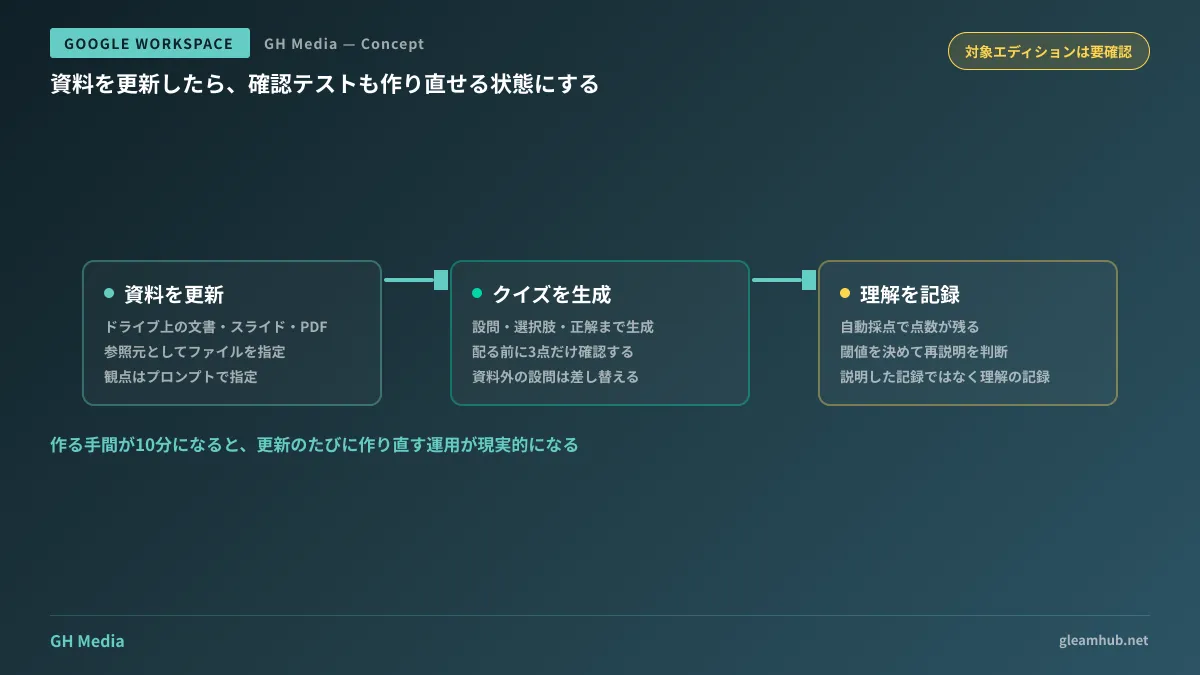
Specify materials and generate questions
There are only two steps:
- Specify what kind of quiz you want to create via a prompt
- Specify files in Drive as reference sources (Docs, Slides, PDFs, etc.)
With this, Gemini generates the quiz complete with questions, choices, and configured answer keys. Because Forms quizzes are inherently built to auto-grade when correct answers are designated, the generated quiz is immediately ready to grade submissions.
While you could previously ask for suggested questions, suggesting question prompts was merely survey design assistance, entirely different from a quiz with defined correct answers. Having answers already attached is the critical practical advantage. Because grading is also automated, administrators are freed from manual review tasks.
When generation becomes effortless, operations change
What you can change with this capability matters far more than the feature itself. When comprehension checks can be created in 10 minutes, workflows like the following become realistic:
Recreating review tests every time manuals are updated. Previously, tests were likely created only for the initial version and neglected after updates. Re-designating the updated document as the reference source will generate questions aligned with the new content.
Preparing different questions for each department. Even with the same employment regulations document, the key points field teams and administrative departments need to grasp differ. Specifying different perspectives in your prompts allows you to generate tailored quizzes for each.
Using them during contractor and part-timer onboarding. After briefing contractors on data handling rules, you verify their comprehension. Rather than keeping a record of having explained the rules, you preserve a record of verified comprehension. This distinction carries significant practical weight.
The third point also proves valuable when organizing knowledge distribution and permission management. Having an audit trail of who was briefed on what makes decisions to grant permissions much easier.
Do not distribute generated quizzes without review
As is always the case with automated generation, whether it can be used as-is depends entirely on the content. There are three checkpoints before distribution:
First, does it ask about things not written in the document? Even when reference sources are designated, questions may draw upon general knowledge. If questions that cannot be answered from the materials alone slip in, recipients will perceive them as trick questions.
Second, does it test the critical points you want people to remember? Generated questions tend to be formulated around prominent text in the document. It is quite common for rules you truly need observed to be written in an inconspicuous single line. In such cases, you will need to add those questions manually.
Third, are the correct answers truly correct? In questions touching on company-specific practices, something that is generally correct may differ from your organization's rules. Because grading is automated, an incorrect answer key skews everyone's scores.
Checking all three points takes only a few minutes. A task that once took an hour to write is now reduced to 10 minutes of generation plus 5 minutes of review.
Check eligible editions beforehand
Because this is a Gemini feature, availability varies depending on your subscribed edition. Before rolling it out internally, check your organization's eligibility in the Admin Console.
You will also want to verify access permissions for files designated as sources. The person creating the quiz must be able to open those documents. When referencing files with restricted viewer access, such as HR materials, check beforehand whether the quiz creator has the necessary permissions.
For features rolled out in stages, it might simply be that the feature "has not arrived yet" rather than an Admin Console setting issue. Arrival times can vary by one to two weeks depending on which release track your organization is on. If a feature is unavailable, checking this track is faster than troubleshooting configuration settings.
To sustain the practice, establish review criteria
Even if creation becomes easy, it is meaningless if no one reviews the results. Many companies stall here, so establish these rules in advance.
You only need to decide two things: who reviews the response results, and below what score a re-briefing is required.
The latter must be a concrete number. A vague rule like "re-explain if comprehension is insufficient" will not be maintained. Deciding that "scores below 70% require a verbal follow-up" removes guesswork for reviewers. Because Forms quizzes aggregate scores automatically, the review process takes only minutes once thresholds are established.
What to do next
First, identify one document updated within the past year for which the comprehension test was never remade. You likely have one in mind already. That should be your first candidate.
Next, try generating a quiz referencing that document. Generating one in practice will immediately show you whether it reaches a usable quality for your materials. If it does not, the source document itself is likely ambiguous—which is the higher-priority issue to fix first.
GleamHub offers free IT and Google Workspace consultations covering internal knowledge organization, training curriculum design, and operational process automation via Google Workspace. Because approaches depend on existing documentation status and team structure, please reach out for personalized advice via our contact form.
Sources
- Check out new Google Workspace features from August 2026 — Google Workspace Blog
- Google Announces Workspace Drop for August 2026: Enhanced Meet Note-Taking, Form Quiz Generation, and More — HelenTech
- Create and grade quizzes with Google Forms — Google Docs Editors Help
- Get started with Google Workspace with Gemini — Google Drive Help




