
Even though the same notebook was shared with both sales and administration, the answers to "when is the expense reimbursement deadline?" differ by department. One returns the correct date, while the other answers, "I don't have that information." This happens even though the notebooks are supposed to have the same content.
The cause is almost always permissions. And this symptom has become more frequent with the introduction of the duplication feature.
Duplicating entire notebooks is now supported
Starting August 17, 2026, users can duplicate notebooks themselves in Gemini Notebook. Previously, while you could view shared notebooks, you could not customize them for your own use.
Duplicates include not only sources, but also assets created in Studio. Audio/video overviews, study guides, flashcards, quizzes, slides, saved prompts, and customized chat configurations are all included. On the other hand, personal notes and chat history are not duplicated. These are designed with the assumption of not being shared.
For internal use, a clean pattern is, for instance, having general affairs create a notebook compiling workplace regulations and application workflows, and having each department duplicate it to add their own operational rules. Departmental editions can be created without altering the original.
Sources drop based on the permissions of the person who duplicates
This is the true nature of the symptom described at the beginning.
When Google Drive files are used as sources, those sources will not be included in the duplicate unless the person duplicating has access to the original file and permission to copy it. Because the notebook itself is shared, the duplication process succeeds. No error is displayed. However, it is created with part of its content missing.
Because creators view it with their own permissions, they cannot notice the omission. The recipient also has no way of knowing what went missing. When an answer like "no information available" is returned, the troublesome part of this state is the inability to distinguish whether the information truly does not exist or if the source was dropped.
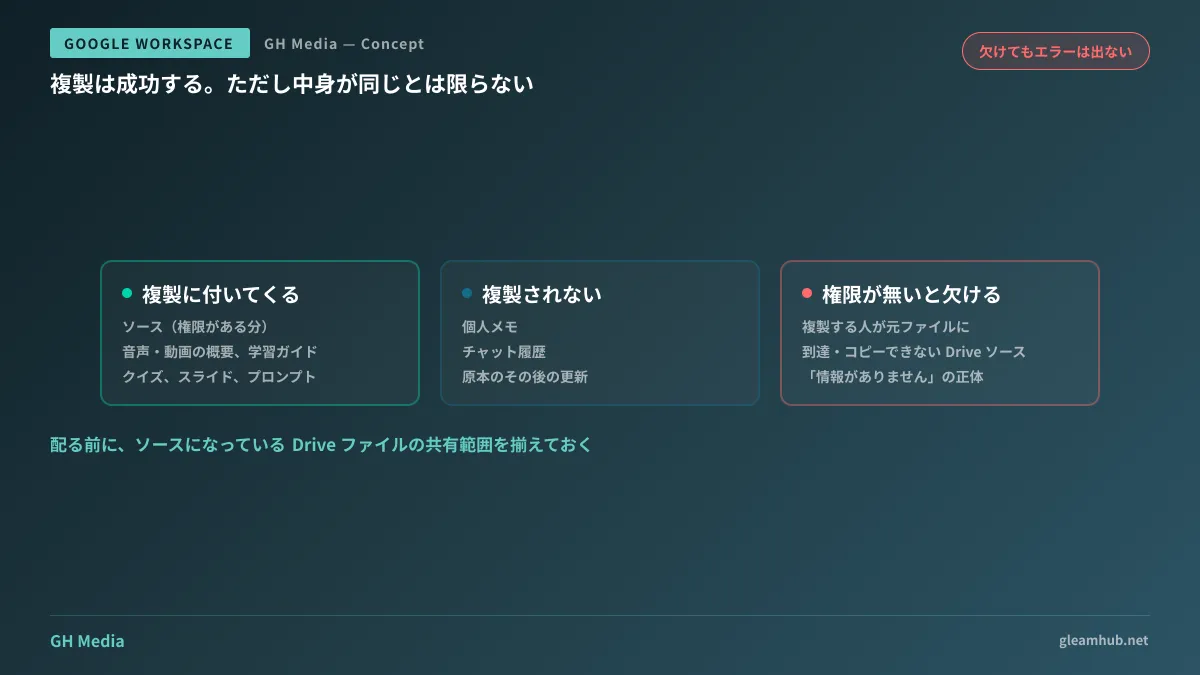
The countermeasure is simple: align the sharing scopes of source files before distribution. Check whether the recipients of the shared notebook can also access the Drive files referenced by that notebook. If you distribute without verifying this, the symptom above will occur. The audit procedure for Drive sharing states is compiled in Auditing Drive link sharing.
Duplicates are independent — updates to the original are not propagated
There is another characteristic that invariably impacts operations. Duplicated notebooks become completely independent of the original.
In other words, even if general affairs updates the workplace regulations in the original, the copies duplicated by each department remain outdated. The side that duplicated does not notice their notebook is outdated. They will continue using what they have on hand, believing it is the latest version.
This is not a defect but by design; however, for internal knowledge distribution, it is a hazardous characteristic. If items that "are meaningless unless they are always up to date," like workplace regulations or pricing rules, are distributed via duplication, multiple versions will proliferate across the company six months later.
It is practical to separate distribution methods based on the nature of the content.
- For materials that must always be up to date (regulations, price lists, procedure manuals), do not allow duplication, and share the original so everyone views the same document. If departmental notes are needed, consider adding departmental sections to the original or referencing them from separate notebooks instead of adding sources.
- Duplication is suitable for materials intended to be built upon individually from that point in time (training materials, project research notes, proposal drafts). If the premise is that the original will not be updated, independence causes no trouble.
If duplication is permitted simply "because it is convenient" without drawing this line, a situation where no one can tell which version is authoritative quietly spreads.
There is also a setting to prevent duplication
Owners can block duplication itself by turning off the "Allow copy" setting. For materials mentioned above that "must always be up to date," disabling this setting is safe.
Disabling the setting leaves recipients with no choice but to view the original. While it may look inconvenient, it is well worth it for rules and regulations for the sole reason that version proliferation is prevented.
Conversely, for items like training materials, keeping it enabled to encourage duplication leads to higher utilization. Instead of treating everything the same by default, decide for each notebook whether to allow duplication. The act of deciding takes only a few seconds per notebook.
"The AI can't answer" is usually a matter of permissions
The first complaint from companies that adopt Gemini Notebook internally is almost without exception: "It doesn't answer when asked." And the cause lies not in AI capability, but in not having reference materials properly aligned.
The duplication feature can work to either exacerbate or reduce this problem. If you distribute after aligning permissions, it spreads in a usable form for each department. If you distribute without aligning them, defective versions will proliferate for every user.
The positioning of Gemini Notebook itself and how far SMEs can leverage it are summarized in What changes with Gemini Notebook. Designing it to reference operational flows in combination with Workspace Studio can be found in Integrating internal knowledge lookup into operational workflows.
What to do next
First, list the notebooks currently shared internally, and note beside each whether it needs to be up to date. This single column separates what should be allowed to duplicate from what should have duplication disabled.
Then, only for notebooks where duplication is permitted, verify the sharing permissions of the source Drive files. If everyone with whom it is shared can access those files, no data will drop during duplication. If someone cannot access them, fix that before distribution.
GleamHub provides support for internal knowledge consolidation, Gemini Notebook operational design, and Drive permission structure reviews through our free IT and Google Workspace consultations. Design varies depending on the nature of the materials handled, so please consult us individually via Contact.




