"Our office software costs go up every year, but all that gets added are AI features, and our frontline staff barely use them"—over the past year, companies raising this discussion around license renewal time have noticeably increased. What staff actually do is create estimates, write reports, and tally numbers—scarcely different from 10 years ago.
Meanwhile, decision-making material has been scarce on whether options detached from AI features are truly viable. Against this backdrop, a new version of a product that explicitly declared a policy against including AI was released.
The office suite that explicitly "chose not to include AI"
On August 26, 2026, The Document Foundation released LibreOffice 26.8, an open-source office suite. Development reportedly spanned roughly eight months from December 2025, involving 206 contributors.
What drew attention to this release, even more than its new features, was that it explicitly stated generative AI features were intentionally omitted. Its published design policy emphasizes that documents are never transmitted to remote services and that all components function without a network connection.
This stands in stark contrast to Microsoft 365 and Google Workspace, which have positioned AI capabilities at the core of their product expansions.
Improvements were introduced across the following three areas:
| Improvement area | Details |
|---|---|
| Paragraph Composer | Typesetting algorithm that adjusts justified line spacing across entire paragraphs rather than line by line |
| Variable font support | Native OpenType variable font support, allowing weight and width adjustments in a single file |
| Office compatibility | Improved interoperability for Microsoft Office format files |
All of these focus on whether documents look proper as documents. The positioning is unmistakable: rather than generating text with AI, the focus is entirely on ensuring generated text is cleanly formatted.
Setting aside the assumption that the entire company must use the same tool
If you jump to "then let's migrate the entire company to LibreOffice," you will usually hit a wall. The obstacle to migration is not the document files themselves, but everything surrounding them: email, calendars, shared drives, external co-authoring, and workflows powered by Excel VBA macros. An office suite is used not as standalone software, but as an integral part of operational infrastructure.
A realistic approach is abandoning the assumption of company-wide uniformity. If different departments have different needs, assigning them different tools is perfectly fine.
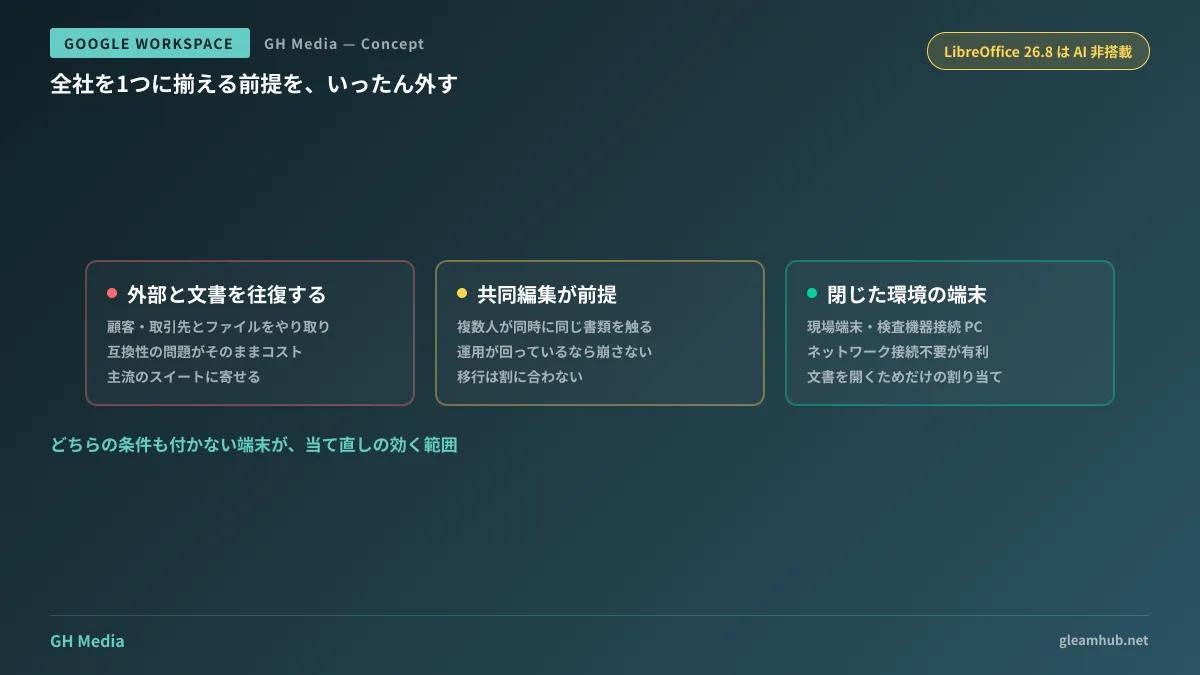
The evaluation criteria can generally be organized into the following three pillars:
- Do they exchange documents externally? For departments exchanging files back and forth with clients or business partners, compatibility issues become direct costs. For these teams, sticking with mainstream suites is the safest choice.
- Is real-time collaborative editing a operational prerequisite? If workflows where multiple users simultaneously edit the same document are well established, disrupting that setup through migration is rarely worth it.
- Are devices in an isolated environment? For terminals prohibited from sending data externally or operating in networks disconnected from the internet, designs requiring no network connectivity offer a straightforward advantage.
Where it actually works: "a subset of the company"
For this reason, options like LibreOffice are viable in most companies not across the entire organization, but for a subset. Specifically, terminals where users do not exchange documents externally and collaborative editing is not required: shop-floor workstations in manufacturing, PCs connected to inspection equipment, and administrative terminals on closed networks.
Cases where paid licenses continue to be assigned to such machines are actually common. When performing a license audit, it is standard to discover a steady number of terminals "used exclusively to open documents."
Conversely, cutting back here does not require formulating a company-wide migration plan. You simply need to reassign tools individually to the terminals uncovered during the audit.
Easily overlooked migration costs
However, tasks remain even after deciding which terminals to reassign. The three areas that genuinely demand effort are as follows:
First is validating internal templates. In templates for estimates or reports, gridline positions and font specifications can subtly shift. Even with improved compatibility, discrepancies will not be zero. Opening a few frequently used templates and inspecting them all the way through printing is the most reliable method.
Second is printing and PDF export. Even if a layout appears identical on screen, page break locations may shift. If operations involve outputting forms on paper, be sure to verify this step.
Third is user support channels. If staff have nowhere inside the company to ask when they encounter unfamiliar operations, they will ultimately revert to the original software. If only a few machines are involved, designating one lead is sufficient.
None of these are heavy undertakings, but switching over without doing them will inevitably trigger rollbacks.
Are AI features "unused" or simply "unusable"?
There is one more distinction to make: whether paying for AI features is wasteful, or if they simply have not yet been adopted, are two entirely different questions.
If the former, shifting to plans or products without those features is correct. If the latter, the moment you move away, the gap between you and your competitors will widen. If you skip this assessment and decide "it's not being used, so switch to the cheaper option," you will end up having to reverse that decision later.
Telling the difference is simple: look at actual usage data in numbers. Out of the assigned licenses, how many users are actually accessing AI features? If the number is near zero, rather than people actively avoiding them, it is far more likely that how to use them has not been communicated internally. Even among companies that began comparisons following Microsoft 365 price increases, conclusions diverged depending on whether they made this distinction first.
What to do next
First, list all terminals currently assigned office suite licenses. Next, mark them against two criteria: "Do they exchange documents externally?" and "Do they collaborate in real time?" The devices that receive neither mark are the ones where this discussion directly applies.
Next, verify the actual number of active users of AI features. If you jump to the cheaper option while this figure remains low, you may reduce costs, but you will forfeit the opportunity to enable your team to leverage those tools.
GleamHub provides free IT and Google Workspace consultations covering comparative reviews of Google Workspace and Microsoft 365, license audits, and departmental software allocation planning. Because the optimal setup varies based on your current contracts and actual operational workflows, please consult with us individually. Reach out via our contact page.
Sources
- LibreOffice 26.8 released: "deliberately omits" AI features — gihyo.jp
- LibreOffice 26.8 semiannual major update focuses on typesetting, writing systems, and Office compatibility — Mado no Mori
- LibreOffice 26.8 released: features "Paragraph Composer" optimizing full paragraphs — Think IT
- LibreOffice 26.8 is out – local first, and with no AI — The Register