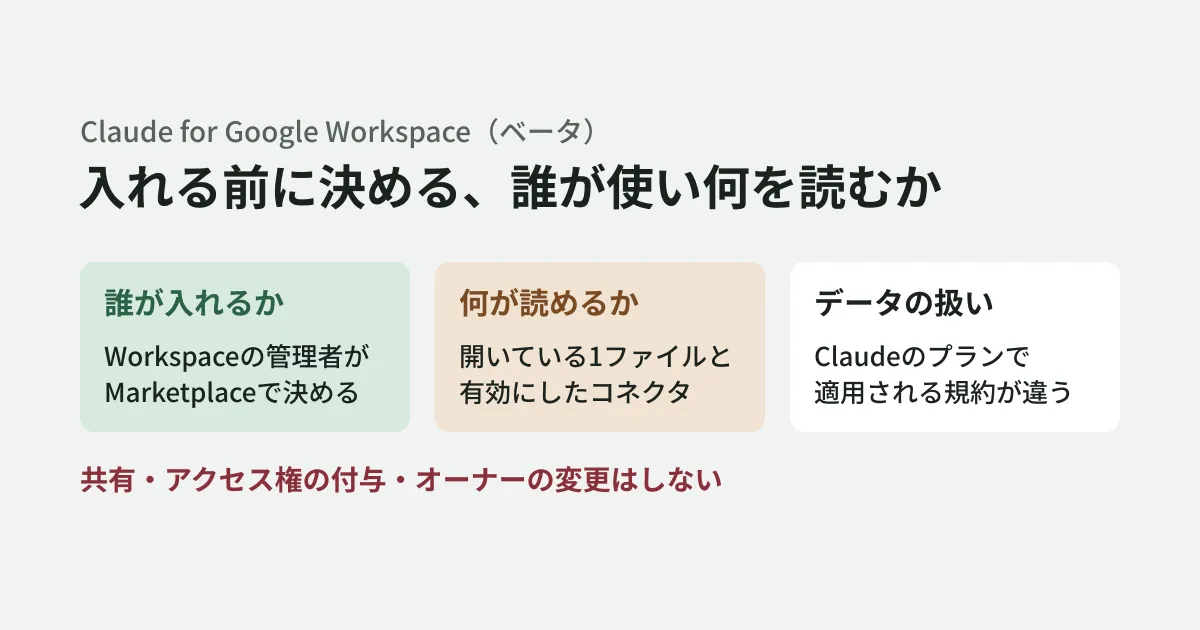
When an employee asks, "I want to use Claude next to my spreadsheet, so please allow it," what a Google Workspace admin wants to know is what Claude can do to company files once it is allowed, and who can stop it.
Anthropic offers Claude for Google Workspace, an add-on that lets you use Claude inside Google Docs, Sheets and Slides, as a beta. Whether it can be installed is determined by settings on the Workspace side, and which connectors and models can be used is determined by settings on the Claude side. Because the information needed to decide is split across two admin consoles, allowing it after looking at only one of them may lead to it being used in ways you did not expect.
In this article, we organize the items admins should decide before rollout, based on Anthropic's help pages, Claude's product page, the Google Workspace Marketplace listing and the Google Workspace Admin Help.
A separate mechanism from connectors
Claude has long had a "Google Workspace connector" that lets you search and reference Gmail, Google Calendar and Google Drive from claude.ai chats. We covered how approval for sending and sharing is handled in Claude's Gmail and Drive integration: approval for sending and sharing.
This add-on works in the opposite direction. The help page describes it as "Claude comes to the file you have open." A Claude sidebar opens on the right side of Docs, Sheets and Slides, reads the open file and edits it directly in place. A single installation adds it to all three apps.
According to the help page, it is offered as a beta and is available on Claude's Pro, Max, Team and Enterprise plans. You also need a Google account that is permitted to install Google Workspace Marketplace apps.
Who can install it is decided on the Workspace side
The help page states that which installation method is available "is determined by your Workspace admin's Marketplace settings, not by your Claude plan."
- Users install it themselves: select "Install" on Claude's Marketplace page, review the permissions and allow them
- Admins install it for the organization: a super admin selects [Admin install] on the Marketplace page, then chooses [Everyone in your organization] or [Certain groups or organizational units]
In organizations that block Marketplace apps by default, one option is to let users install only allowlisted apps and add Claude to the allowlist. According to Google's Admin Help, in the Admin console go to [Apps] > [Google Workspace Marketplace apps] > [Apps list], open [Settings for user installs], and under [Manage access to apps] allow only allowlisted apps. Claude is added via [Allowlist app] in the same [Apps list]. Both Anthropic's and Google's help pages state that admin installation remains possible even while user installation is blocked. Blocked users see "This application is not allowed by your administrator"; this is a Google message, and only the Workspace admin can lift the restriction.
Both Anthropic's and Google's help pages treat admin installation for the organization as a super admin task. In organizations where the super admin role is concentrated in one person, decisions about installing and removing the add-on fall to that one person. We covered how to divide these permissions in Is your company's Google Workspace "super admin," who controls everything, just the CEO?.
To remove it, select Claude in the Admin console under [Apps] > [Google Workspace Marketplace apps] > [Apps list] and uninstall it. Anthropic's help page states that it is removed for everyone the next time each user reopens a file. On the other hand, according to Google's Admin Help, only apps installed by an admin can be uninstalled from the Admin console, and copies that users installed themselves are not affected. It also notes that changes can take up to about 24 hours to take effect. In organizations that allow users to install it themselves, reliably stopping it requires reviewing the allowlist and user install settings in addition to uninstalling.
The add-on's permissions and what it cannot do
According to Anthropic's help page, Claude requests two main permissions from Google the first time.
- Display and run external web content in sidebars and similar areas inside Google applications
- See and manage the documents, spreadsheets and presentations in which this add-on has been installed
In the permission list on the Google Workspace Marketplace listing, the second permission is split into three, for Docs, Sheets and Slides, and the list also includes "See your primary Google Account email address" and "See your personal info, including any personal info you've made publicly available." The help page explains that it does not request access to Google Drive, Gmail, Calendar or Contacts, or permission for files to communicate over the network, and none of these appear in the listing either. What Claude can read is the open file (including any selected portion) and the contents of connectors enabled by the organization. Access stays within the Google sharing permissions that user already has.
Claude's edits are recorded under that user's name and remain in the file's version history. A toggle at the bottom of the sidebar lets you choose between "Ask before edits" (the default), which asks for confirmation before every edit, and "Accept all edits," which lets ordinary edits proceed without stopping. In either case, inserting images from a web address, adding links and removing someone's access always require the user's approval. Sharing files, granting access and changing ownership are said not to be performed even if requested.
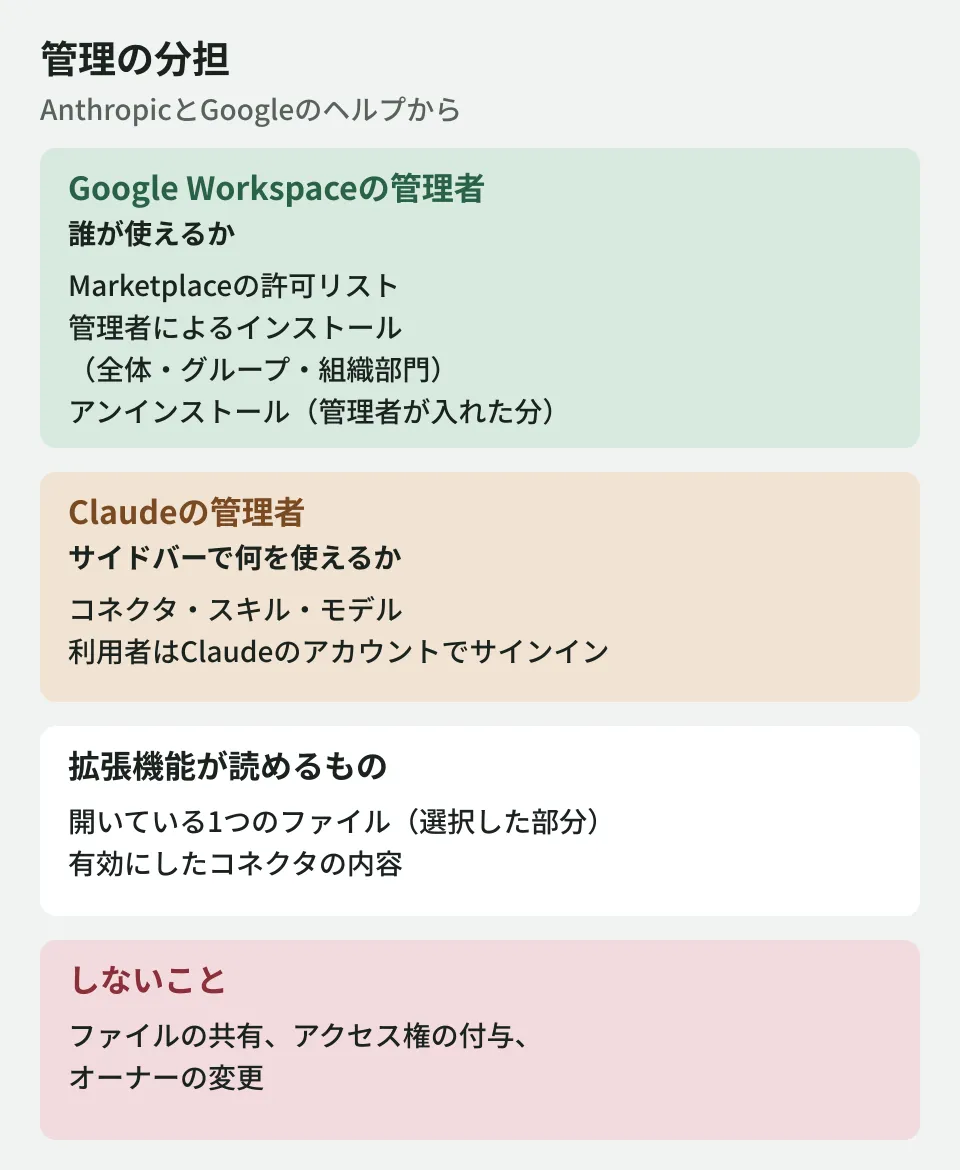
As the diagram shows, administration is split in two. The Workspace admin decides "who can use it," and the Claude admin decides "what can be used in the sidebar." According to the help page, the sidebar inherits the Claude organization's settings (connectors, skills and models), and users sign in with their Claude account (including SSO if the organization uses it). Sign-in with API keys or through cloud providers is not supported.
Data handling depends on the Claude plan
The help page states that the contents of the open file, messages and attached files are sent to Claude and used to generate responses, and then divides the applicable terms by plan.
- Team and Enterprise: the organization's Commercial Terms and Data Processing Addendum
- Pro and Max: the Consumer Terms and Privacy Policy
In all cases, it states that this content is not used for model training. Inputs and outputs are, in principle, deleted from Anthropic's systems within 30 days, and custom data retention settings configured by the organization are not carried over. Chat history is stored in the user's browser, per file.
The Enterprise plan supports retrieving sessions via the Compliance API, customer-managed encryption keys (CMEK) and exporting audit logs via OpenTelemetry. On the other hand, it does not support routing through third-party inference platforms such as Amazon Bedrock or Vertex AI, or zero data retention (ZDR), and Anthropic asks that it not be used for information covered by HIPAA.
From here on is the editorial team's analysis. What Workspace settings determine is who can use the add-on; which Claude plan's account that person signs in with is a separate matter. If company files are handled with a personally contracted Pro or Max account, they are processed under terms different from the organization's contract. We could not find, in the help page's descriptions, any way to restrict through Google-side settings which Claude account is used to sign in. Before deciding the scope of rollout, it is a good idea to decide whether your internal rules will state that "company files must be used with Team or Enterprise accounts."
Beta limitations
The main limitations listed in the help page are as follows.
- Only files in Google Docs, Sheets and Slides formats can be used. Word, Excel and PowerPoint files must be converted to Google formats first
- It cannot open, create or copy files other than the one that is open, or export to PDF
- Supported browsers are Chrome, Edge and Safari. Firefox is not supported
- Google stops a single operation after a maximum of 6 minutes. Closing the sidebar also stops the work
- It cannot read, reply to or resolve comments in Docs. Claude's edits are applied as direct edits, not as suggestions
- It cannot read Connected Sheets tabs linked to BigQuery
- Charts created in Slides are inserted as images and are not updated when the underlying numbers change
Be careful with files received from outside
The help page warns that files may contain instructions from other people written in white text or extremely small text. It states that Claude is designed to treat document content as data rather than commands, to alert you when it finds hidden text, and not to follow instructions in documents that ask it to share files, obtain links or make contact. It then asks users to check the content before approving operations Claude proposes, especially for files received from outside the organization.
Having Claude summarize quotes or specifications received from outside the company is a natural use case, so the editorial team recommends communicating the default "Ask before edits" as the organization's recommended setting.
What to decide before rollout
Based on the above, here are the items the editorial team thinks are worth deciding before rollout.
- Rollout scope: whether to admin-install it for everyone or only for the groups of departments trialing it, and whether to allow user self-installation via the allowlist. If you allow it, keep in mind that uninstalling from the Admin console does not remove self-installed copies
- Accounts to use: which Claude plan accounts may be used for company files (whether to limit them to Team and Enterprise)
- Connectors: how far to enable the connectors available from the sidebar in the Claude organization's settings. Enabling the Google Drive connector allows access to files other than the one that is open (per the help page FAQ)
- Edit confirmation: whether to communicate "Ask before edits" as the default
- Information not to handle: decide which types of information must not be handled, on the assumption that third-party inference platforms and zero data retention are unavailable
- Records: on Enterprise, whether to set up the Compliance API and a destination for audit logs
If you expand the rollout gradually, first admin-install it per group, then review the edit version history and questions from users before expanding further; this makes it easier to roll back if problems arise.
Scope of verification
On October 28, 2026, we reviewed Anthropic's help page "Use Claude in Google Docs, Sheets, and Slides" (updated October 13) and Claude's product page "Claude for Google Workspace" (desk research). On October 29, 2026, before publication, we confirmed that the same help page had not been updated, and reviewed the permission list on Claude's Google Workspace Marketplace listing (updated October 22) and the Google Workspace Admin Help (allowlists, user install settings, installing for the organization and uninstalling). Admin console item names follow the wording of the Japanese version of Google's Admin Help. We did not install or operate the add-on or change any settings in the Admin console. The sources we reviewed did not state the launch date.
For Google Workspace administration design or creating internal rules for generative AI, contact us through free IT and Google Workspace consultation.
References
- Use Claude in Google Docs, Sheets, and Slides(Claude Help Center)
- Claude for Google Workspace(Claude)
- Claude(Google Workspace Marketplace)
- Manage the Marketplace app allowlist for your organization (Google Workspace Admin Help)
- Install Marketplace apps for your organization (Google Workspace Admin Help)
- Uninstall Marketplace apps for your organization (Google Workspace Admin Help)