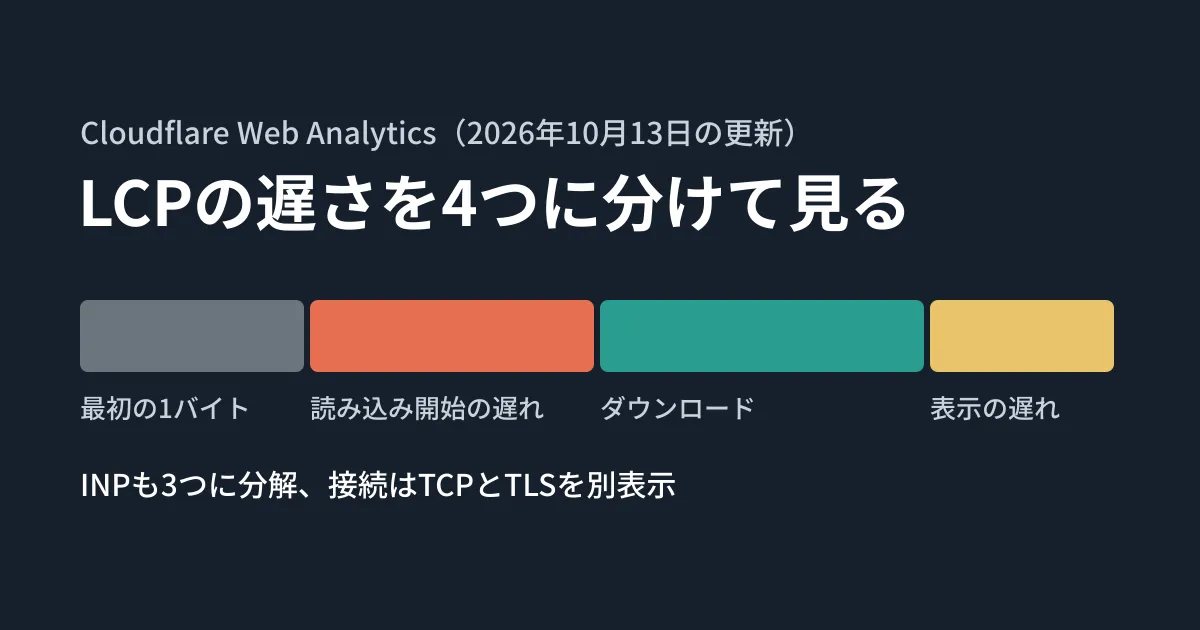
Being told "LCP is showing as slow on smartphones" is not enough on its own to decide whether you should make images lighter, review the server, or cut back on CSS and JavaScript. LCP (Largest Contentful Paint, the time until a page's main image or text is displayed) is a single number, but the cause of the delay differs at each stage.
With its October 13, 2026 update, Cloudflare Web Analytics now shows LCP and INP (Interaction to Next Paint, the time from an action such as a click until the next frame is painted), collected from real visitors, broken down into their respective subparts. In this article, we use official sources to map each subpart to where to look and what to fix, and present the results of checking in our editorial test environment how the subparts actually move. We have not checked the Cloudflare dashboard or API with an account.
What's new in Web Analytics
According to Cloudflare's changelog (Deeper Core Web Vitals Diagnostics, October 13, 2026), three things were added.
- Four LCP subparts: Time to First Byte (until the first byte of the HTML arrives), Resource load delay (from when the HTML starts arriving until the LCP image or other resource starts loading), Resource load duration (downloading that image or resource), and Element render delay (from when the download finishes until it is displayed on screen)
- Three INP subparts: Input delay (the wait from the action until processing starts), Processing duration (running the event handling code), and Presentation delay (from when processing finishes until the next frame is painted)
- Separated connection times: the TCP connection and the TLS handshake (setting up encryption) are shown separately
In the dashboard, according to Cloudflare's guidance, you select a site in Web Analytics and scroll down the Core Web Vitals report to find the subparts, and TCP and TLS are in the Page Load section. The official documentation states that Web Analytics itself is available on all plans.
Note that the documentation's Page load time page (checked on October 22, 2026; last updated April 16, 2026) still says that "for HTTPS, the TCP time includes TLS negotiation." Because the changelog and the documentation are not consistent, when you look at the TCP figure, check the item name on screen to see which display you are looking at.
Each subpart points to a different place to look
How the subparts map to fixes is described in detail in Google's "Optimize Largest Contentful Paint" (an article on web.dev, updated March 31, 2025). The key points are summarized in the table.
| Breakdown | Where to look when it is long | Example fixes from the article |
|---|---|---|
| Time to First Byte | Server response, too many redirects, CDN cache not being used | Reduce redirects; keep URL parameters from causing cache misses |
| Resource load delay | The LCP image cannot be found from the HTML (it is specified inside CSS or JavaScript), its priority is low, loading="lazy" | Write it in the HTML, add <link rel="preload"> and fetchpriority="high", serve it from the same origin |
| Resource load duration | Image file size, distance to the server delivering it, contention with other loads | Make the image smaller, use a CDN (image CDN), make caching effective |
| Element render delay | CSS or synchronous JavaScript in <head> still waiting to load, setups that insert the element later with JavaScript, long tasks | Reduce render-blocking CSS and JavaScript, render on the server side, break up long tasks |
The same article gives, as a guide for a well-optimized page, a ratio in which Time to First Byte and the load each account for about 40%, and the two sub-parts with "delay" in their names each account for less than 10%. It also cautions against converting this ratio into seconds, and advises looking at it as a ratio between the sub-parts.
INP works the same way. "Optimize Interaction to Next Paint" (updated September 2, 2025) lists the places to review for each sub-part: for Input delay, other work on the main thread such as script loading and parsing or timer processing; for Processing duration, the weight of the event handling itself; and for Presentation delay, the size of the DOM and the rendering load.
Moving the sub-parts in a test environment
Cloudflare's documentation does not say which calculation method its beacon uses. So the editorial team used web-vitals (published in the GoogleChrome repository; 6.2.3, attribution build), a library that outputs sub-parts with the same names, to check how the sub-parts move when the page structure changes.
The tests were run with a local server and Chromium 141 (headless). The LCP image was a 1600×900 JPEG (about 744 KiB), which the server sent in 64 KiB chunks every 0.1 seconds so that the download took about 1.1 seconds. Each condition was measured three times, and the figures below are medians. Every delay was created deliberately on the server or page side, and the figures are not values from real sites or connections. Please read them as values for seeing how the sub-parts move.
| Condition | LCP | Sub-part that moved most |
|---|---|---|
Baseline: image written in the HTML, fetchpriority="high" | 1136ms | Resource load duration 1103ms (the others each a few tens of ms or less) |
| Image added by JavaScript that arrives 0.6 seconds late | 1772ms | Resource load delay 614ms |
CSS that arrives 3 seconds late added to <head> | 3056ms | Element render delay 1942ms |
| Server waits 1.2 seconds before returning the HTML | 2368ms | Time to First Byte 1202ms |
| Image reduced to 800×450 (about 107 KiB) | 136ms | Resource load duration 101ms |
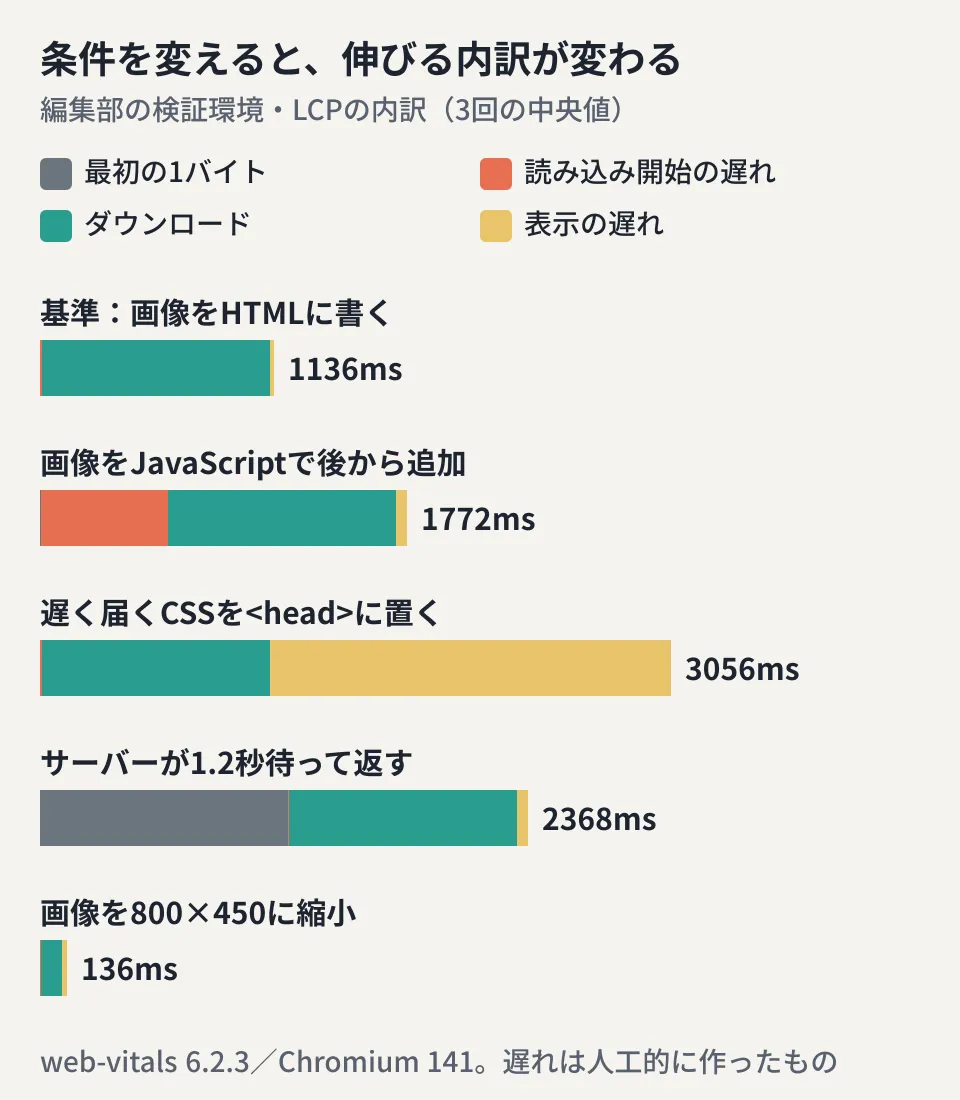
Under every condition, the reason the total LCP grew showed up in the sub-part corresponding to what was changed. Under the slow CSS condition, the image download finished in about 1.1 seconds, the same as the baseline, but the image was not displayed until the CSS arrived, and that difference went into Element render delay. Under this condition, compressing the image would not shorten LCP.
On the other hand, under the condition with loading="lazy", Resource load delay was 33ms (8ms in the baseline), a small difference. This is likely because the communication was local with no latency and the image was in the viewport from the start, so this result cannot tell you how large the effect would be on a real site.
INP was checked in the same way. Adding 0.3 seconds of work to a button's click handler made Processing duration 302ms; running 0.4 seconds of other work just before the click made Input delay 349ms; and adding 0.3 seconds of work to the rendering after the click handler (requestAnimationFrame) made Presentation delay 310ms. Only the sub-part corresponding to where the work was added grew.
Points to note when retrieving the data with GraphQL
You can retrieve the sub-parts not only from the dashboard but also through the GraphQL Analytics API. The fields listed in the changelog are as follows.
- LCP and INP sub-parts: names with percentiles in
rumWebVitalsEventsAdaptiveGroups, such aslcpResourceLoadDelayP50andinpInputDelayP50(others includetimeToFirstByte,lcpResourceLoadTime,lcpElementRenderDelay,inpProcessingDurationandinpPresentationDelay) - TCP and TLS:
connectionTimeWithoutTLSP50,tlsTimeP50and so on inrumPerformanceEventsAdaptiveGroups. The combinedconnectionTimealso remains - Percentiles: P25, P50, P75, P90, P95, P99, P999
The changelog says the unit is microseconds and that negative values indicate missing data. The Core Web Vitals values on the dashboard are described as milliseconds, so remember to divide by 1000 when lining them up in a spreadsheet or similar. If you include negative values in an average as they are, the numbers will look smaller than they really are. As of October 22, the GraphQL documentation does not yet describe these fields, and we have not confirmed what an actual query looks like.
In addition, according to the FAQ, beacon data is kept for 7 days without sampling and is then aggregated down to about 10%. Sampling is also applied at query time depending on the conditions and the number of records. When closely comparing low-traffic pages over periods older than 7 days, it is safer to read the data with the reduced record counts from aggregation in mind (the editorial team's view).
How to write it up when requesting or reporting improvements
From here on are the editorial team's suggestions. When making requests to a web agency or reporting internally, writing not just the LCP figure but also "which element on which page has which sub-part running long, at which percentile" lets the person in charge decide where to start. For example, if you know that "for the hero image on the top page, the P75 Resource load delay accounts for half of LCP," the discussion becomes one of reviewing where the image is specified and its priority, before compressing the image.
When comparing before and after an improvement, compare the same percentile over periods of the same length, and also check whether the ratio of sub-parts has moved closer to the guide (the two delays under 10%). The basics of measurement and the steps for image optimization are covered in our practical guide to Core Web Vitals optimization and our guide to CDN × image optimization.
Note also that for sites routed through Cloudflare, there is a setting that automatically inserts the Web Analytics measurement script. Before you start measuring, check how this relates to your privacy policy and whether there are any unintended insertions. We covered this point in Migrating nameservers increased our JS.
Scope of verification
On October 22, 2026, we checked Cloudflare's changelog entry "Deeper Core Web Vitals Diagnostics" (October 13, 2026) and the Web Analytics documentation (Core Web Vitals, Page load time, FAQ and overview), both on the public pages and in the source files in the cloudflare/cloudflare-docs repository. We checked the mapping between sub-parts and fixes against web.dev's "Optimize Largest Contentful Paint" (updated March 31, 2025) and "Optimize Interaction to Next Paint" (updated September 2, 2025), and the README for
web-vitals6.2.3 (document research). In addition, in the editorial team's test environment (Linux, Node.js v22.22.0, Chromium 141.0.7390.37,web-vitals6.2.3), we changed the conditions of a test page and measured the LCP and INP sub-parts three times each (hands-on testing). The network delays were created artificially on the server side and are not values from real sites or connections. We have not checked the display in the Cloudflare dashboard or the GraphQL API, the calculation method used by Cloudflare's beacon, or the values in Safari and Firefox.
For improving page speed or rebuilding a site based on measurements, please contact us through our website development and redesign consultation.
References
- Deeper Core Web Vitals Diagnostics: LCP & INP Sub-Part Metrics in Real User Monitoring (source of the Cloudflare changelog entry, cloudflare/cloudflare-docs)
- Core Web Vitals(Cloudflare Web Analytics docs)
- Page load time(Cloudflare Web Analytics docs)
- FAQs(Cloudflare Web Analytics docs)
- Optimize Largest Contentful Paint(web.dev)
- Optimize Interaction to Next Paint(web.dev)
- GoogleChrome/web-vitals(README、LCPAttribution・INPAttribution)