You made internal data available to query through AI, but "last month's sales" does not match the dashboard figure. Possible causes include SQL written by the AI that adds in incomplete orders, joins to a line-item table that inflate amounts, or an assumption that the fiscal year starts in January. Even if you give the AI the location of the data and column descriptions, these calculation rules do not get across.
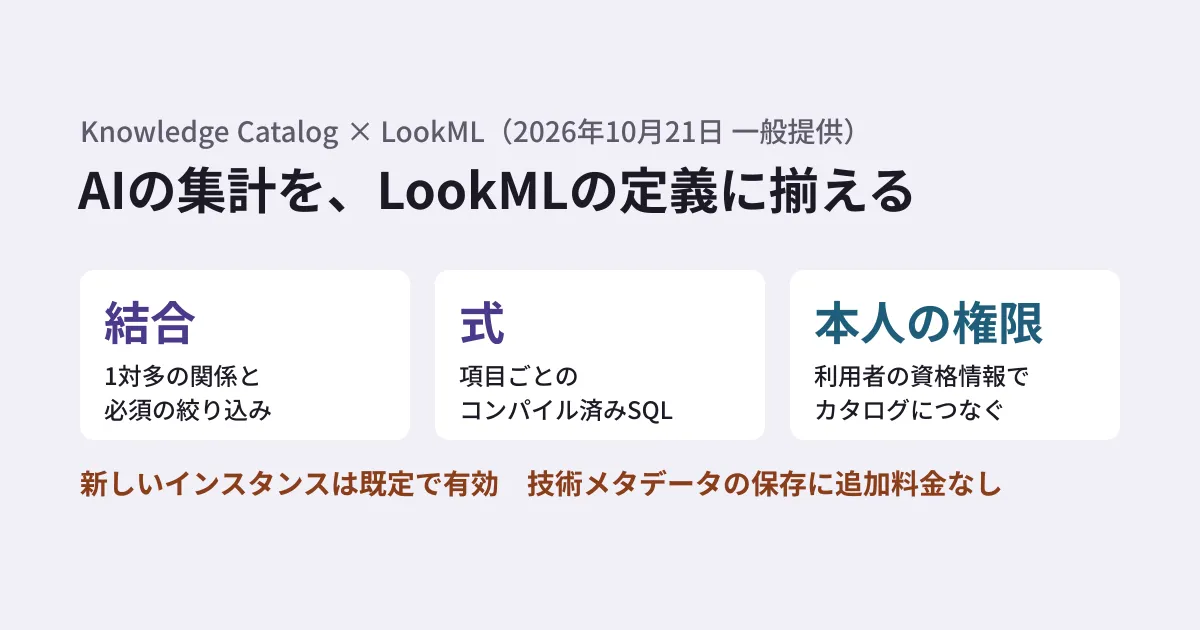
A feature that automatically ingests LookML, Looker's modeling language, into the data catalog Knowledge Catalog (formerly Dataplex Universal Catalog) is now generally available. It appears under the October 21, 2026 entry in the Looker release notes, and Google Cloud announced it on its official blog on October 26. It applies to Looker (Google Cloud core) (written as Looker Core on Google Cloud in the blog).
The blog explains that Gemini Enterprise and custom AI agents can use the ingested definitions as the basis for generating SQL. However, the integration between Gemini Enterprise and Knowledge Catalog is in preview as of November 6, 2026. What has become generally available is the ingestion part. This article covers what is ingested, how it is used, and what you need to enable it.
Two reasons AI aggregations drift
The blog lists two problems that AI agents connected directly to database tables fall into.
- Drift in metric definitions: For metrics such as net sales and customer acquisition cost, each agent ends up creating a different formula. Agents cannot apply business rules such as "count as sales only when the order status is complete" or "prorate annual contracts by days of use"
- Row growth from joins: Joining tables with one-to-many relationships, such as invoices, line items, and refunds, without defined join relationships increases the number of rows and inflates the total amounts
The blog separates the roles: the catalog tells you "what data is where and how it is governed," while LookML determines "how the numbers are calculated." This feature lets you look up both in the same place.
What is ingested
According to the blog, catalog integration until now was limited to file-level references and lists of dashboards. With this feature, Looker (Google Cloud core) ingests resolved LookML into Knowledge Catalog at the following levels.
| Units | Main content ingested (as described in the blog) |
|---|---|
| Model | Descriptions, database connections, the include hierarchy, data tests (assert), and parent-child relationships with Explores, Views, and dashboards |
| Explore | Join types, sql_on, relationships such as many_to_one, foreign_key, required_joins, sql_where, required filters (always_filter, access_filter), and the provided starter queries |
| Views and fields | Compiled SQL expressions for each column, primary keys, timeframes, field synonyms, and derived table transformation logic |
| Dashboards, Looks, and tiles | Filters, chart types, owners, and usage statistics. Table and column lineage from BigQuery tables to tiles |
The blog explains that sync is always on by default and that changes to production LookML are reflected in Knowledge Catalog in near real time. According to the documentation, the integration is enabled by default on instances. It can be stopped with the "Opt out of Knowledge Catalog integration" instance setting or with --no-catalog-integration-enabled in gcloud looker instances update. After it is enabled, it takes up to one day for Looker data to appear in the catalog.
In addition to the table above, the documentation lists Looker instances, agents, and LookML projects as units that are ingested. Lineage from BigQuery to Looker (information that traces the flow of data) is a feature that separately became generally available on October 26. The opt-out setting stops only metadata ingestion; lineage is managed with the Data Lineage API and the service-side ingestion settings.
How it is used in Gemini Enterprise
First, let's check the release stage. The integration between Gemini Enterprise and Knowledge Catalog, and the federated query mode that queries data such as BigQuery where it resides, started as previews in the October 2, 2026 release notes. As of November 6, the documentation still describes them as preview. They are subject to the Pre-GA terms, and support may be limited.
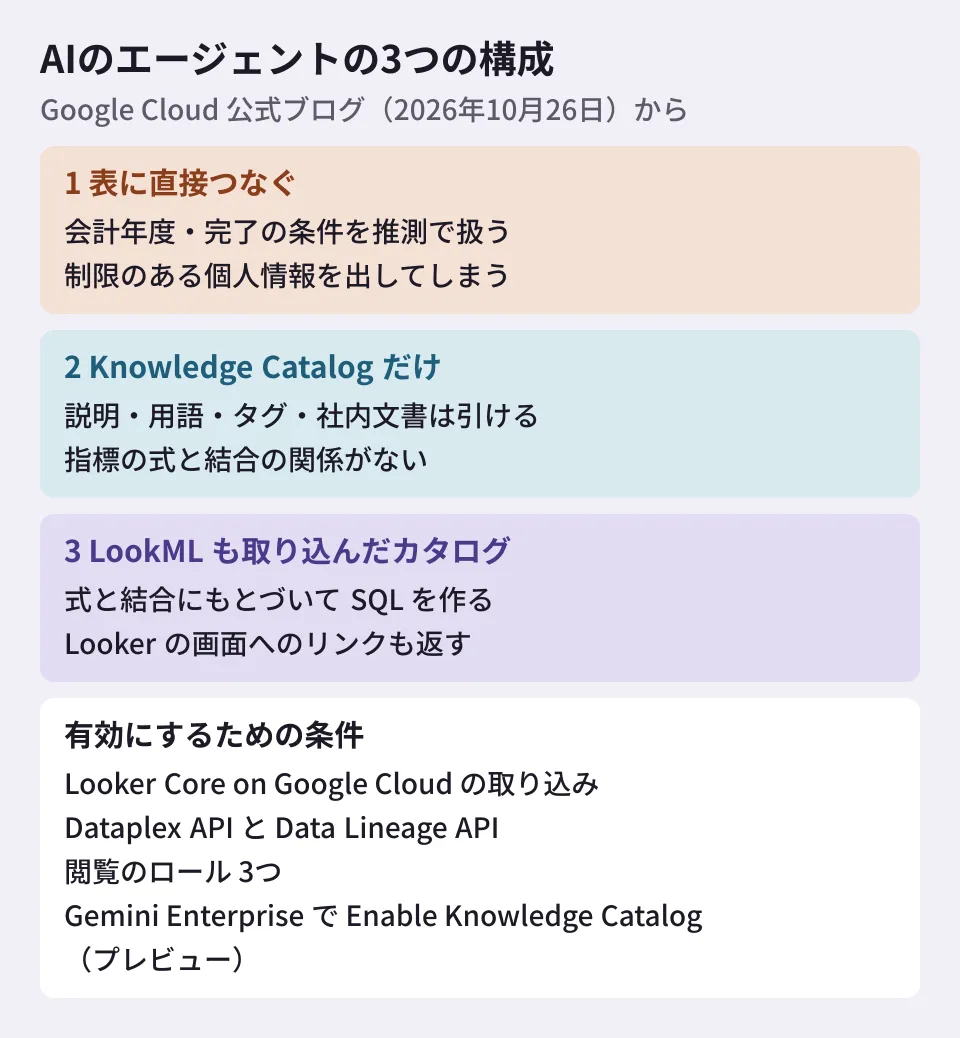
The blog compares three configurations using the example question "sales by product category for the last fiscal quarter, and the regional promotion rules that apply."
- Configuration connected directly to tables: With no catalog or definitions, it assumes a fiscal year starting in January, adds in incomplete orders, and exposes restricted customers' personal information
- Configuration using Knowledge Catalog alone: It can look up table descriptions, the glossary, personal information governance settings, and the promotion rules PDF, but without metric formulas and join relationships, it may miss the completion condition or increase rows
- Configuration using Knowledge Catalog with ingested LookML: In addition to governance information, it generates SQL based on LookML joins and formulas. In the example, it applies the completion condition, the May to July fiscal quarter, and the defined joins
In the third configuration, the agent first uses Knowledge Catalog to check whether the LookML model to be used is certified and what governance tags the columns have, then maps the question to LookML dimensions and measures. The blog says that along with the answer, it returns an "Open in Looker Explore" link set with the same measures and filters.
This flow is the blog's description. The Gemini Enterprise documentation (updated October 30) does not mention Looker or LookML, either in its explanation of the Knowledge Catalog integration or in its best practices for Data Cloud connectors. As measures against wrong metrics and joins, it lists custom skills, the Knowledge Catalog glossary, and verified sample queries (golden queries). On the other hand, the Knowledge Catalog documentation describes using ingested LookML as the basis for query generation by AI agents. How far Gemini Enterprise uses LookML needs to be confirmed by actually running it.
On how to choose between this and Conversational Analytics in Looker, the blog's guidance is to use Conversational Analytics when asking within defined Explores in Looker, and Gemini Enterprise with Knowledge Catalog enabled when asking across multiple data sources such as BigQuery, BI metrics, and internal documents. It says custom agents can look up the same information with the Knowledge Catalog lookupContext method (written as LookupContext API in the blog). This method was added as a preview in the June 4, 2026 release notes, and later release notes have no entry for general availability. The guide and reference pages do not show a preview label, so check the release stage before using it.
What you need to enable it
The blog's "getting started" section has the following three stages. We have described the roles and APIs separately after checking them against the documentation.
- Check ingestion on the Looker side: Confirm that metadata integration for Looker (Google Cloud core) is enabled. The blog says it is enabled by default on new instances. To view it in the catalog, enable the Dataplex API in the project containing the instance. If you use lineage, also enable the Data Lineage API. Grant users
roles/dataplex.catalogViewer,roles/looker.schemaViewer, androles/datalineage.viewer - Enable Knowledge Catalog in Gemini Enterprise (preview): It is enabled automatically when you attach a BigQuery (or Spanner, Cloud SQL, or AlloyDB) data store in federated query mode. You can change this in the Google Cloud console by toggling "Enable Knowledge Catalog" from Configurations > Assistant in the Gemini Enterprise app and selecting "Save and publish"
- Ask questions: Gemini Enterprise connects to Knowledge Catalog with the user's own credentials. Assets for which the user lacks read permission on the underlying data (for example,
roles/bigquery.dataViewer) are excluded from search results, so users can find and query only what IAM allows
There are two differences between the blog and the documentation.
- Role name: The blog writes the first role as
roles/dataplex.viewer. The Knowledge Catalog documentation on the Looker integration and the Gemini Enterprise documentation listroles/dataplex.catalogViewer. This article follows the documentation - Whether the Dataplex API is needed: The blog includes enabling the API in its steps. The Knowledge Catalog documentation also says it must be enabled to view ingested metadata. On the other hand, the Gemini Enterprise documentation says this integration uses internal APIs, so you do not need to enable the Dataplex API for the integration. If you read the conditions for viewing in the catalog screens or API separately from the conditions for the Gemini Enterprise integration, both explanations hold
The documentation gives two cautions about roles/looker.schemaViewer. It can be granted only from the gcloud CLI, at the project level. Users who are granted it can see the metadata of all integrated Looker instances in that project.
This applies to Looker (Google Cloud core). The Looker release notes list this feature under "Looker (Google Cloud core) only changes." This Gemini Enterprise documentation is for the Standard, Plus, Pay-as-you-go, and Frontline editions; the Business edition is covered in a separate help center.
What to check on pricing
The blog's statement that "there is no additional charge for storing Looker technical metadata" matches the pricing section of the documentation. However, this is about storage. The following parts are charged.
- API calls and adding business metadata: Standard Knowledge Catalog pricing applies
- Looker lineage processing: According to the pricing page, billing starts on March 1, 2027. Lineage reported before then is free. Reporting lineage for one node costs approximately 0.0325 DCU-hours (about $0.0029 in us-central1), charged at the first report and at each change, such as changing and republishing a Looker model
- Lineage metadata storage: It is not covered by the free treatment of automatically ingested technical metadata, and is billed under the metadata storage SKU
Lineage ingestion can be stopped, so we recommend deciding whether to use it before billing starts.
Editorial proposal: what to get in order before connecting
This feature passes definitions written in LookML to AI. If the definitions themselves are not in order, the AI's answers will not be either. We propose checking the following points before adoption.
- Whether the metrics you want AI to use are defined as LookML measures. If revenue recognition conditions or proration rules exist only in dashboard-side calculations or in materials outside the tables, move them into LookML first
- Whether relationships (
relationship) are correctly written on one-to-many joins. This is the part that serves as the basis for preventing row growth - Whether IAM viewing permissions match the scope you are willing to show. Because it runs with the user's own credentials, overly broad permissions also mean broad visibility through AI.
roles/looker.schemaViewertakes effect at the project level, so also check how Looker instances are divided across projects - How to indicate which models are "OK to use". The blog's example checks for certified models. Create operating rules so that prototype models do not get mixed in
- How far to use the preview parts in your work. Even though ingestion is generally available, the Gemini Enterprise integration is in preview. Confirm in a test app that the SQL follows the LookML definitions before expanding to more users
We covered preparation before passing BigQuery data to AI in the Data Agent Kit article, and cost limits for BigQuery AI functions in the token limit article.
Scope of verification
On November 6, 2026, we opened the Google Cloud official blog post (October 26, 2026), the Looker, Knowledge Catalog, and Gemini Enterprise release notes, the Knowledge Catalog documentation on the Looker integration, the
lookupContextguide, the pricing page, and the Gemini Enterprise documentation on the Knowledge Catalog integration, and checked the release stage, scope, ingested content, enablement steps, role names, and pricing (document research). We have not tested this in Looker or Gemini Enterprise. How far Gemini Enterprise uses LookML, the current release stage oflookupContextand what it returns for Looker items, and the handling in the Business edition are unconfirmed.
For designing connections between internal data and AI agents, please contact us through consultation on development, AI, and automation.
References
- LookML metadata indexing in Knowledge Catalog is now GA(Google Cloud Blog、2026-10-26)
- Looker release notes
- Knowledge Catalog release notes
- Manage Looker (Google Cloud core) resources with Knowledge Catalog
- Connect to Knowledge Catalog(Gemini Enterprise)
- Gemini Enterprise release notes
- Best practices for Data Cloud connectors that use conversational analytics(Gemini Enterprise)
- Retrieve context for data assets(Knowledge Catalog)
- Knowledge Catalog pricing