If your company website runs on Apache on a VPS or your own server, you need to check whether your version is affected when you see vulnerability news. However, stable releases of Ubuntu and Debian keep Apache's version number unchanged and backport only the fixes. Even if apache2 -v shows "2.4.58," that alone does not tell you whether you are affected.
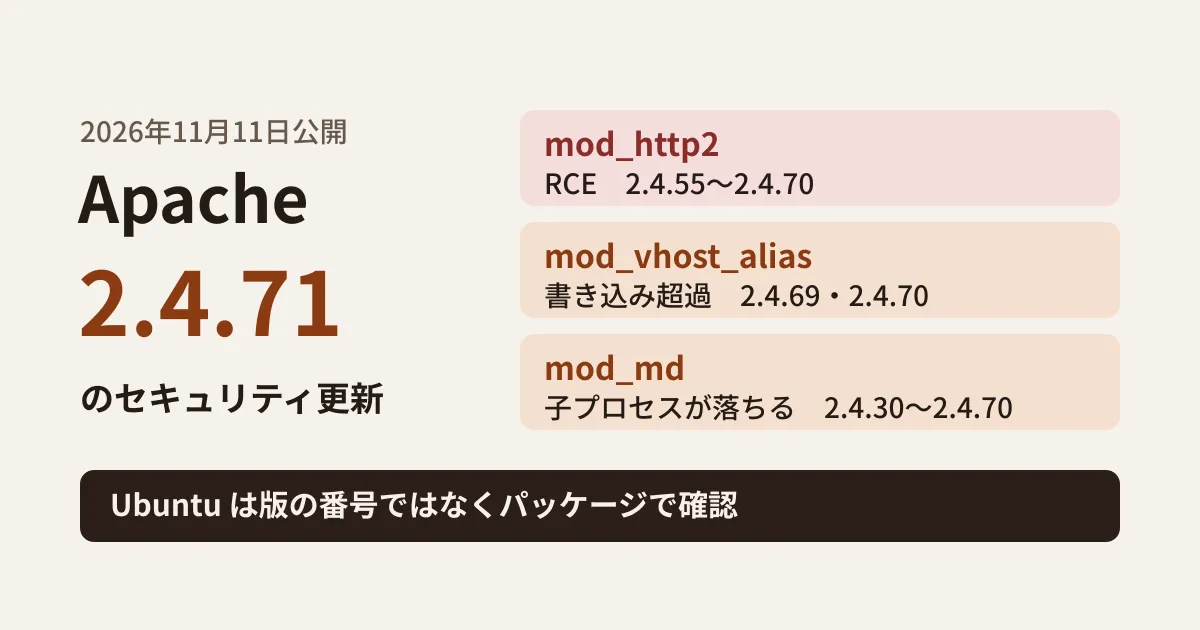
The Apache HTTP Server project released 2.4.71 on November 11, 2026. The announcement describes it as the latest general availability release of 2.4.x and says it is "recommended over all previous releases." Based on the vulnerabilities fixed in 2.4.71, how Ubuntu's notice (USN-9090-1) handles them, and what we found in the contents of the Ubuntu 24.04 packages, this article lays out the order of checks on your own servers.
Vulnerabilities fixed in 2.4.71
The 2.4.71 changes (CHANGES_2.4.71) list the following three security fixes. Affected versions are as stated in the changes, and severity is as stated in Apache's vulnerability list (vulnerabilities_24.html).
| CVE | Affected module and details | Affected versions | Severity |
|---|---|---|---|
| CVE-2026-119618 | Heap corruption in assign_headers() of mod_http2, leading to arbitrary code execution (RCE) | 2.4.55 to 2.4.70 (2.0.8 to 2.0.42 for mod_h2 on GitHub) | critical |
| CVE-2026-109163 | One-byte stack write overflow in mod_vhost_alias (after the fix for CVE-2026-63292) | 2.4.69・2.4.70 | low |
| CVE-2026-106023 | NULL pointer dereference in mod_md, crashing child processes | 2.4.30〜2.4.70 | important |
The most severe is CVE-2026-119618, which the changes describe as "Concurrent Execution using Shared Resource with Improper Synchronization vulnerability in Apache HTTP Server’s mod_http2 in assign_headers() can lead to RCE." Servers accepting HTTP/2 connections are the main targets. mod_md is the feature that lets Apache itself obtain and renew certificates from Let’s Encrypt and similar authorities, and mod_vhost_alias automatically determines the document directory from the host name. If you use neither, those two issues do not apply.
Among the non-security changes, mod_remoteip's RemoteIPTrustedProxyList and RemoteIPInternalProxyList are now applied to the virtual hosts where they are configured, and when they appear in both the main server and a virtual host, they are merged and a warning is logged. If you record users' IP addresses behind a load balancer or CDN, check that the IP addresses in your access logs are as expected after upgrading to 2.4.71.
On Ubuntu, do not judge by the version number
Ubuntu's notice USN-9090-1 (November 12, 2026) covers five fixes: the three above, plus an issue in mod_dav's lock handling (CVE-2026-42528) and an issue with CGI internal redirects (CVE-2026-42356, 26.04 LTS and 26.10 only). The fixed package versions are as follows.
- Ubuntu 26.10:2.4.68-1ubuntu6.2
- Ubuntu 26.04 LTS:2.4.66-2ubuntu2.8
- Ubuntu 24.04 LTS:2.4.58-1ubuntu8.19
- Ubuntu 22.04 LTS:2.4.52-1ubuntu4.27
- Ubuntu 20.04 LTS, 18.04 LTS, 16.04 LTS and 14.04 LTS: provided through Ubuntu Pro (16.04 and 14.04 via the Legacy Support add-on)
The mod_http2 issue deserves attention. The 2.4.71 changes list 2.4.55 onward as affected, but USN-9090-1 states, "This issue only affected Ubuntu 20.04 LTS, Ubuntu 22.04 LTS, Ubuntu 24.04 LTS, Ubuntu 26.04 LTS, and Ubuntu 26.10." That includes 22.04 with 2.4.52 and 20.04 with 2.4.41. Ubuntu's CVE page (CVE-2026-119618) has a security team note saying "newer versions of the module have been backported to stable releases in Ubuntu." The same page lists 18.04, 16.04 and 14.04 as Not affected by this issue. Because distribution packages may include fixes newer than their version number suggests, applying the upstream (Apache project) affected version range as is can lead you to wrongly conclude you are not affected.
What we confirmed in the Ubuntu 24.04 packages
On November 14, 2026, we downloaded apache2 and apache2-bin 2.4.58-1ubuntu8.19 from the Ubuntu 24.04 archive and extracted their contents without installing them.
- The top entry of the package changelog (
/usr/share/doc/apache2/changelog.Debian.gz, a link to the apache2-bin changelog) is 2.4.58-1ubuntu8.19 (noble-security, November 12, 2026), which lists fixes (patches) for four issues: CVE-2026-106023, CVE-2026-109163, CVE-2026-119618 and CVE-2026-42528. The mod_http2 fix is a change tomodules/http2/h2_request.c. - The changelog lists only security fixes and does not include the mod_remoteip behavior change mentioned above.
- The list of modules enabled on a new installation (
enable_default_modulesin postinst) does not include http2, md, vhost_alias or dav. If you have kept the defaults, the three modules involved here are not loaded. - The configuration loaded when http2 is enabled (
mods-available/http2.conf) is the single lineProtocols h2 h2c http/1.1; once enabled, the server accepts both encrypted HTTP/2 (h2) and cleartext HTTP/2 (h2c).
However, the defaults of a new installation are only a starting point. Changes may have been made during operation, such as enabling HTTP/2 to speed up the site or using mod_md for automatic certificate renewal, so check the actual server.
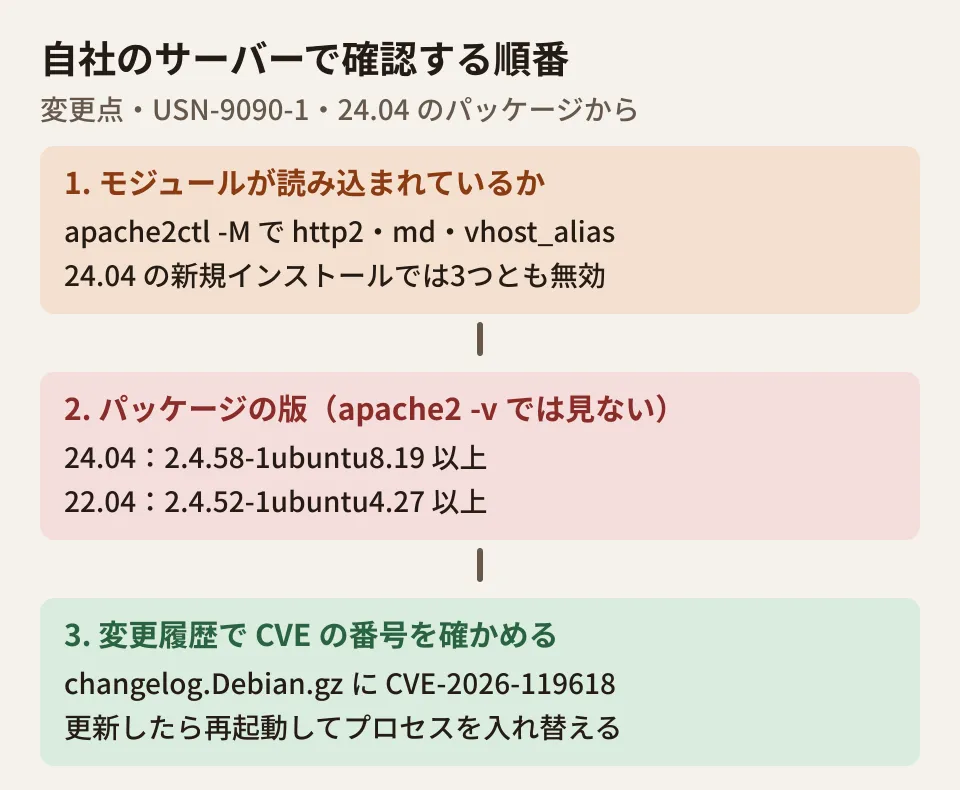
Order of checks on your own servers (editorial suggestion)
The following commands are standard on Ubuntu and Debian. We did not run them on an actual server while preparing this article.
- Check whether the modules are loaded. Confirm whether
http2_module,md_moduleorvhost_alias_moduleappear in thesudo apache2ctl -Mlist. Also usegrep -ri 'Protocols' /etc/apache2/to note where the settings that accept HTTP/2 (h2,h2c) are located. - Check the package version. Confirm that "Installed" in
apt-cache policy apache2is at or above the fixed version for your Ubuntu release. Do not judge by whatapache2 -vshows (such as 2.4.58). - Check the CVE numbers in the changelog. You can confirm whether the fix is included with
zgrep -n 'CVE-2026-119618' /usr/share/doc/apache2/changelog.Debian.gz. - Update and restart. After
sudo apt update && sudo apt install --only-upgrade apache2 apache2-bin, usesudo systemctl restart apache2to replace the processes with new ones. The fix does not take effect while old processes remain.
If circumstances prevent you from updating right away, one possible temporary measure is to configure the server not to accept HTTP/2 (Protocols http/1.1). This is the editorial team's view, not a workaround given in Apache's announcement. Dropping HTTP/2 can affect page speed, so treat it only as a stopgap until you update.
Even in setups behind a CDN or load balancer that accepts HTTP/2 at the front, the origin's mod_http2 is used if the origin server can be reached directly from the internet or if the front end connects to the origin over HTTP/2. Do not decide you are unaffected by looking only at the front-end devices.
Shared servers and other distributions
In environments such as shared hosting, where the provider handles Apache updates, users cannot update it themselves. Check the provider's incident and maintenance information for the status of 2.4.71 or equivalent fixes. Red Hat-based and other distributions may also backport fixes while keeping the version number unchanged, as Ubuntu does, so check each distributor's security information for the fixed packages by CVE number.
We covered how to check whether fixes are applied by CVE number on servers covered by Ubuntu Pro in our article on Ubuntu Pro's pro fix. If you also want to check core updates for a WordPress site, see our WordPress 7.1.4 article as well.
Scope of verification
On November 14, 2026, we reviewed the Apache HTTP Server announcement (Announcement2.4.txt, dated November 11, 2026), the changes (CHANGES_2.4.71, downloads.apache.org), CHANGES in the 2.4.x branch of apache/httpd, and Ubuntu's USN-9090-1 (desk research). On November 20, we rechecked Apache's vulnerability list (httpd.apache.org), USN-9090-1 and Ubuntu's CVE-2026-119618 page, and confirmed that no version newer than 2.4.71 and no follow-up to USN-9090-1 had been released. We also downloaded apache2 and apache2-bin 2.4.58-1ubuntu8.19 for Ubuntu 24.04 with apt-get download and extracted them to check the changelog, postinst and configuration files. We did not install the packages, start Apache, reproduce the vulnerabilities, or run the commands above on an actual server.
GleamHub's website development consultation covers post-launch operation of company websites, including server updates. What to check depends on your setup, so please reach out via our contact form.