As Gemini license renewals approach, decision-makers invariably ask the exact same question: "How much is it actually being used?"
Many organizations find themselves trapped in a state where they can only answer, "We conducted a survey, and it was generally well received." Those who use it do so enthusiastically, while those who do not have never even opened it. Without the ability to demonstrate that distribution in numbers, they are forced to make decisions solely on whether to renew.
Starting in August 2026, Google Chat usage was added to the Gemini reports dashboard. Because the scope of questions that can be answered has expanded significantly, let us organize how to restructure the decision-making criteria for renewals.
Previous numbers did not include Chat
In the Admin Console's Gemini reports, feature-by-feature usage and threshold reports have been available for some time. However, the scope centered on surfaces like Gmail and Docs; Gemini usage in Chat was outside the tally.
This has a major practical impact. In organizations where daily communication centers on Chat, opportunities to interact with Gemini are concentrated heavily within Chat itself. Having it summarize long spaces or refine draft replies—these represent some of the most frequent use cases in volume, yet they never appeared anywhere on the reports.
As a result, decisions that Gemini "isn't being used" may have been made using figures that omitted invisible surfaces. While we previously addressed where Gemini actually proves useful internally in Moving Beyond the State of Adopting Gemini Without Utilization, you cannot even begin discussing countermeasures if the measurement scope itself is insufficient.
Different visibility at the organizational unit vs. user level
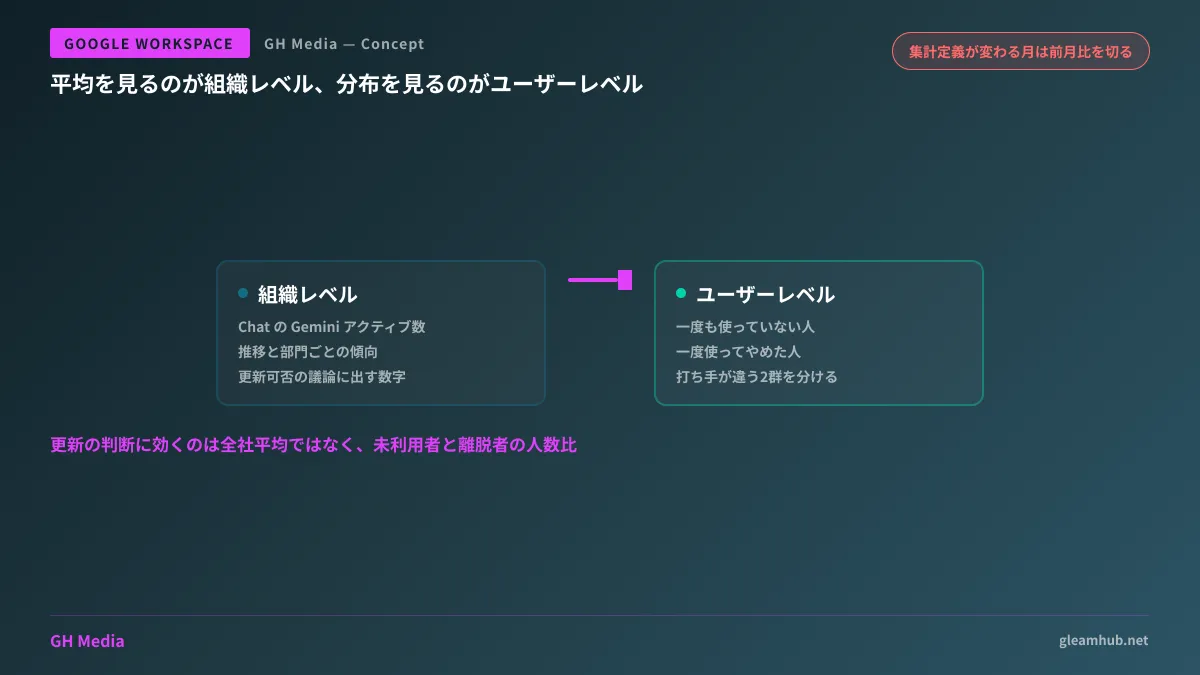
Two tiers have now been added. Each answers a different set of questions.
At the organizational level, you can track the number of active users leveraging Gemini in Chat alongside their trends over time. This is intended for understanding trends in which departments use features like summarization or generation, and to what extent. These are the numbers you present when discussing whether to renew.
At the user level, you can check how much specific users are utilizing Gemini. Even if company-wide averages make it appear "fairly well used," opening up the breakdown often reveals that usage is heavily skewed toward certain departments. Think of this as a tier designed for looking at distribution rather than averages.
The architectural design of how Gemini is invoked on the Chat side is detailed in Ask Gemini in Chat and Data Source Scope. To understand what is being counted, it is faster to first grasp the entry point architecture.
Shifts in numbers do not necessarily mean increased usage
This is the point that requires the most caution. In conjunction with this update, the definition was revised so that certain Gemini summarization actions in Chat are now treated as "active." This is because they are actions initiated directly by the user.
In other words, reported active user counts and overall usage metrics will appear to increase even if actual usage behavior has not changed at all.
If you calculate month-over-month changes without knowing this, the following misinterpretations will occur:
| What happens | Flawed interpretation |
|---|---|
| Active count spikes in August | Concluding that "the initiative worked" and continuing the same measures |
| Year-over-year comparison shows a discontinuity | Reporting that "adoption improved compared to last year" |
| Department rankings shift | Mistaking departments with heavy Chat usage for having "advanced Gemini adoption" |
The fix is straightforward: draw a line in the month the definition changed, and do not connect the data across that boundary for comparison. Establish a new baseline using data from August onward, and make September onward the basis for month-over-month comparisons. If you are submitting numbers for an internal approval on renewals, adding that single-line caveat is all it takes.
The sequence to check once low usage is identified
Once measurement is established, the next requirement is interpreting low numbers. Reasons for sluggish adoption generally fall into one of the following three categories:
- It was never enabled in the first place. It is not uncommon for user assignments or per-feature administrative settings to differ from expectations. Reviewing the Admin Console state alongside the scope covered in Admin Assist and Admin Console Gemini Features speeds up verification.
- Users do not know where the entry points are. This is the scenario where months slip by without users knowing what to click to summon Gemini. In this case, distributing a one-page cheat sheet on "how to invoke it on frequently used screens" works far better than formal training.
- Users tried it, but it did not fit their daily work. This alone requires a completely different approach. Rather than forcing usage rates up, this is a stage where you must re-evaluate and narrow down which tasks actually benefit from it.
If user-level reports allow you to separate "those who have never used it" from "those who tried it once and stopped," distinguishing between categories 1 and 3 becomes drastically simpler. What you need for renewal decisions is not the company-wide average, but the ratio between these two groups.
What to do next
First, open the Gemini reports and check whether the Chat item is displayed. If it is, capture a screenshot of the organizational-level figures at that moment. This will serve as your new baseline following the definition change.
Next, determine how many months of data you need to gather, working backward from your next license renewal date. If you rush to compile figures one month before renewal, you will be left with data that spans across the definition change.
GleamHub offers free IT and Google Workspace consultations covering how to measure the effectiveness of Google Workspace Gemini rollouts, how to isolate causes of sluggish adoption, and how to review license configurations. Because the approach depends on your organization's size and current usage patterns, please consult with us individually. Feel free to reach out via Contact Us.
Sources
- View Google Chat usage metrics in Gemini reports dashboard — Google Workspace Updates
- Google Workspace Weekly Recap - August 21, 2026 — Google Workspace Updates
- View Gemini feature usage and threshold reports in the Admin console — Google Workspace Updates
- Review Gemini usage in your organization — Google Workspace Help